


Stay Updated
Get new essays and workshop announcements in your inbox.
CopilotKit Channels: the bridge between Slack and the agent
A Slack channel is a room such as #engineering-standup. A CopilotKit Channel is the application integration that lets an existing agent participate in Slack, Teams, or another collaboration surface. In this project, the object returned by createChannel(...) binds the agent, its tools, inbound message handlers, identity policy, and conversation state. It is closer to the bot's communications layer than to a chat room.
That layer does more than just save a webhook handler. It gives the application a small set of provider-neutral concepts:
- A message contains the normalized text or content parts plus the provider references needed for safe processing.
- An actor identifies the human Slack says sent the message. The model does not get to choose that identity.
- A thread represents the conversation being handled. It can be subscribed, passed to the agent, and used to post a reply without rebuilding Slack addressing logic in every tool.
- A Channel tool is a typed server-side action the agent may select. Channels supplies the trusted message, actor, platform, and thread context when the handler executes it.
The practical effect is easy to see. A teammate writes @standup-pulse show today's blockers in Slack. CopilotKit Intelligence delivers that event to the local Channel, the mention handler runs the Mastra agent for that thread, and Gemma selects the narrow blocker tool. The tool reads SQLite and posts a typed card back to the same thread. Channels turns that card into Slack's native Block Kit payload and sends it through the configured provider connection.
The model never receives a Slack webhook and it never calls Slack's API directly. Slack-specific transport stays at the Channel boundary; the agent sees a conversation and a safe set of tools. That separation is what makes it possible to keep the agent and business logic local without writing the entire provider integration from scratch.
What the finished loop does
The daily workflow contains five steps:
- A teammate mentions the bot in Slack and provides yesterday's work, today's plan, and any blockers.
- The bot subscribes to that Slack thread, so follow-up messages in the thread no longer need another mention.
- A typed tool records the update for the verified Slack actor and the server's current work date.
- The bot posts a native Slack confirmation card.
- The dashboard shows participation, missing updates, blockers, and the health of the local model and managed Channel.
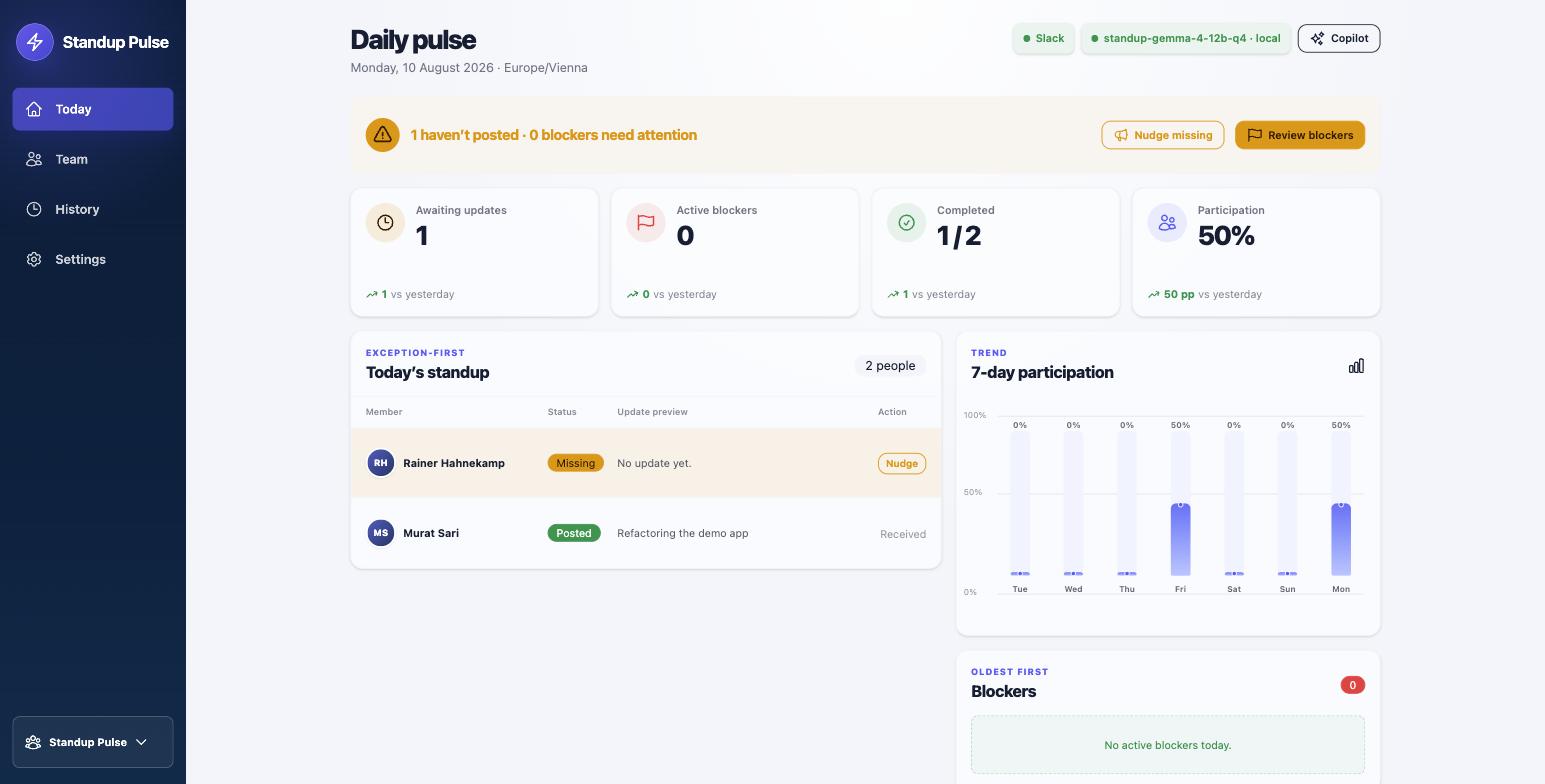
The source of truth is SQLite. The model interprets a message and chooses a narrow tool; the server decides who the person is, which team they belong to, which date applies, and whether the event has already been processed.
Architecture: what is local and what is managed
Slack and managed transport remain external; the agent, model, application data, and dashboard run locally.
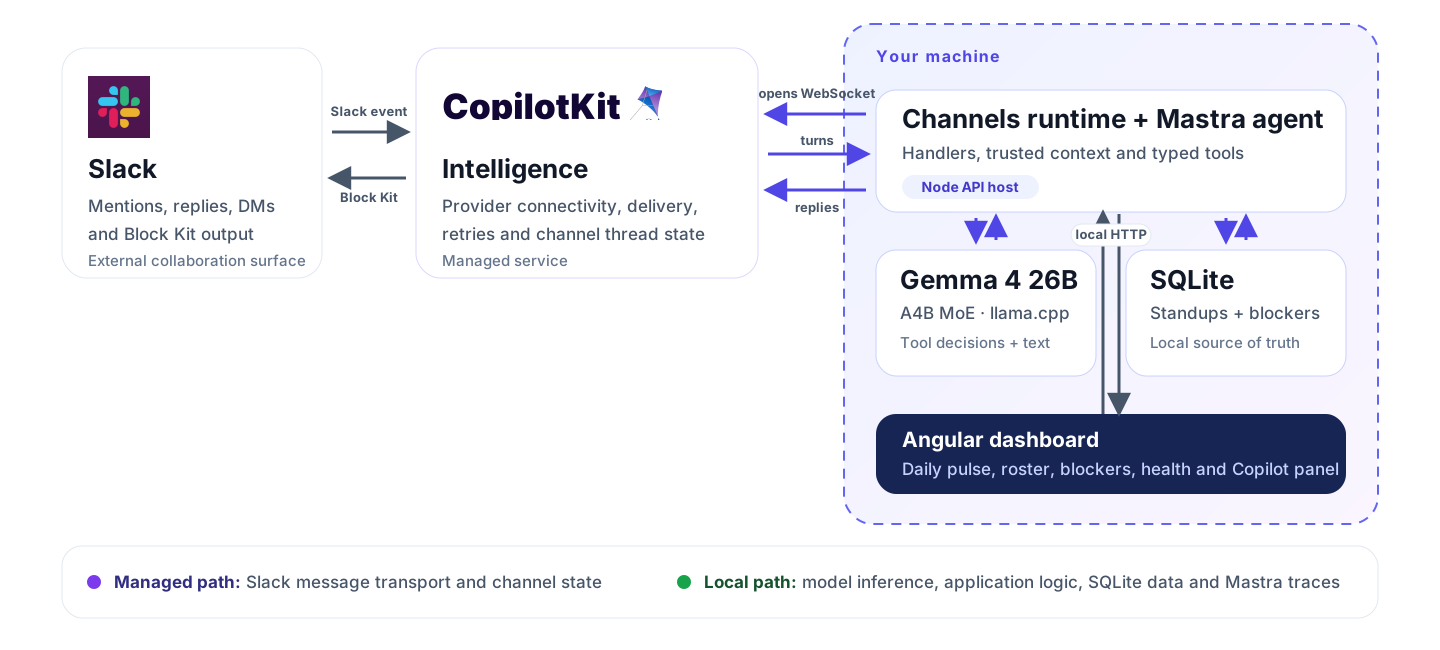
The message path has four parts:
- Slack sends an event to the request URL in the generated app manifest.
- CopilotKit Intelligence receives the provider event and delivers the turn to the running Channel.
- The local Node process runs the Mastra agent and any selected tools.
- The response travels back through the managed Channel and is rendered in Slack.
The local process makes an outbound gateway connection. Slack's event and interactivity URLs point to CopilotKit's infrastructure, so this setup does not require ngrok (or any other reverse proxy), router configuration, or a public HTTP endpoint on the development machine.
CopilotKit Intelligence is the stateful production layer between Slack and the local agent runtime. In this build, it manages the Slack provider setup and credentials, maps provider conversations to durable Channel threads, delivers turns over the realtime connection, retries delivery, sends the credentialed response back to Slack, and exposes operational status. It does not run the local Gemma model or own the standup database.
As checked on 11 August 2026, CopilotKit's Developer plan is free for one developer seat and includes 500 total Channels credits for prototyping, one Slack or Teams organization, up to five Channels, a maximum of 200 threads, and three-day thread retention. CopilotKit describes the allowance as Channels credits—not as 500 messages—and the 500 credits are total rather than monthly. Check the pricing page before planning ongoing usage because these limits can change.
Stay Updated
Get new essays and workshop announcements in your inbox.
In this article, “local-first” refers to the following explicit system boundary:
| Concern | Location in this build |
|---|---|
| Slack workspace messages and collaboration history | Slack |
| Provider events, delivery metadata, and managed Channel records | CopilotKit Intelligence, subject to the plan's retention terms |
| Agent and tool execution | Local Node process |
| Model weights and inference | Local llama.cpp server on loopback |
| Standups, blockers, roster, and scheduler state | Local SQLite database |
| Mastra execution traces | Local LibSQL observability store, with standup fields filtered before persistence |
Tested stack
The examples in this article are scoped to the following pinned versions:
| Component | Tested version |
|---|---|
| CopilotKit Channels | 0.7.3 |
| CopilotKit Runtime | 1.66.2 |
| CopilotKit CLI used for Channel setup | 4.8.1 |
| Mastra core | 1.57.0 |
| Angular | 22.0.4 |
| llama.cpp | build 10330 (687e77892) |
| Model | unsloth/gemma-4-26B-A4B-it-GGUF, UD-Q4_K_M |
| Test machine | Apple M5 Max, 128 GB unified memory |
The hardware is documented because “runs locally” does not establish a useful minimum requirement. This is the system used for testing, not a minimum specification.
The version pin matters for Channels in particular. The public SDK is evolving, and current documentation may show direct provider adapters or newer entry points. The createChannel(...) snippets in this article match the managed runtime in @copilotkit/channels@0.7.3 used by this repository.
Connecting Slack without exposing the local server
The first-time setup uses a CopilotKit Intelligence account and a Slack workspace where you can install apps. I pinned the CLI invocation used for this project:
$ npx --yes copilotkit@4.8.1 login$ npx --yes copilotkit@4.8.1 channels add \ --name standup-pulse \ --display-name "Standup Pulse" \ --adapter slack \ --jsonThe command declares the managed Channel, writes .copilotkit/channels.json, and generates a Slack app manifest. Slack's own documentation explains why manifests are useful: they are reusable YAML or JSON bundles that can create an app with its scopes, events, and settings already defined. The app is created using Slack's “From a manifest” flow.
For this project, the generated manifest configures the Slack event and interactivity URLs to use CopilotKit Intelligence. After the bot token and signing secret are reconciled, the CLI reports that those setup credentials are stored server-side and can be removed from the local .env file.
The ongoing health check is also pinned:
$ npx --yes copilotkit@4.8.1 channels status --jsonOnce Slack is attached, invite the bot into the standup channel:
/invite @standup-pulseThis managed route is one way to connect Slack. CopilotKit's current Channels SDK reference also documents direct platform adapters. The distinction matters: this article describes the managed Intelligence path used by Standup Pulse.
How Channels maps Slack events to the agent
The most useful Channels abstraction is not the incoming event; it is the conversation around that event. CopilotKit Intelligence handles Slack credentials, event ingress, and delivery in this managed setup. The SDK then gives the local runtime a normalized context with the message, the verified actor, and a thread handle. Application code can decide what should happen without passing Slack channel IDs and timestamps through every layer.
The main abstractions map to Slack as follows:
| Channels abstraction | Slack meaning | Use in Standup Pulse |
|---|---|---|
createChannel(...) |
The logical bot connected to the managed Slack app | Binds the Mastra agent, typed tools, identity mode, and concurrency policy |
channel.onMention(...) |
A message that mentions the Slack bot | Activates the bot and subscribes the current thread |
channel.onMessage(...) |
A delivered Slack message | Handles an unmentioned message only when its thread is already subscribed |
context.actor |
The authenticated Slack actor supplied by the platform | Resolves the Slack user to a local roster member |
context.message |
Normalized text, content parts, provider reference, and event identity | Supplies the agent prompt and the idempotency identifiers |
context.thread |
A handle to the Slack conversation and its Channel state | Subscribes the thread, runs the agent, and posts cards or text |
thread.runAgent(...) |
Start an agent turn for this Slack conversation | Lets the model select the narrow standup or reporting tool |
thread.post(...) |
Send a response to the same Slack conversation | Delivers a receipt, team pulse, blocker digest, or failure message |
thread.runAgent(...) is the handoff point between Channels and Mastra. The handler passes structured contentParts when Slack supplied them and falls back to plain message text. Channels invokes the AG-UI adapter associated with that thread; the adapter runs the local Mastra agent and streams its text and tool activity back through the same conversation.
An initial standup submission follows this sequence:
- Slack emits an app-mention event for the configured bot.
- CopilotKit Intelligence receives and normalizes the provider event, then forwards the turn to the local Channel runtime.
onMentionsubscribes the Slack thread and callsthread.runAgent(...)with the normalized message.- The Mastra agent selects
submitStandupand supplies onlyyesterday,today, andblockers. - The tool resolves
context.actor.idagainst the local roster, calculates the work date, and writes the record to SQLite. - The tool calls
context.thread.post(<StandupReceiptCard ... />). - Channels translates the JSX message into Slack Block Kit and the managed provider path sends it back to the same thread.
The subscription changes how later Slack events are handled. Importantly, thread.subscribe() does not join a Slack channel or create a new Slack thread. It marks this existing conversation as one Standup Pulse should continue handling after the initial mention. Consider these three examples:
Initial mention in a new thread
@standup-pulseYesterday: completed the Channel event tests.Today: connect the participation card.Blockers: waiting for the Slack app review.This reaches onMention, starts the agent, records the standup for the verified actor, and posts a receipt.
Unmentioned follow-up in the subscribed thread
Show today's participation.This reaches onMessage. Because thread.isSubscribed() returns true, the agent runs and can select renderTeamPulse, which posts the stored totals and Slack's native participation chart. The teammate can keep talking naturally inside the thread without repeating @standup-pulse on every reply.
Unmentioned message in a new top-level conversation
Show today's participation.This also reaches onMessage, but the new conversation is not subscribed. The handler returns without running the agent or posting a reply. This prevents the bot from responding to unrelated channel traffic.
Designing restrained thread behavior
The Channel behavior is intentionally conservative. A top-level mention activates the bot and subscribes it to that thread. Later messages receive replies only when they belong to a subscribed thread; unrelated conversations remain quiet.
The central wiring is small:
const channel = createChannel({ name, identifyUser: 'platform', agent, tools: domain ? createStandupChannelTools(domain) : [], store: { concurrency: 'serial' },});channel.onMention(createMentionHandler(logger));channel.onMessage(createSubscribedMessageHandler(logger));The handlers make the policy obvious:
export const createMentionHandler = (logger: ChannelLogger): ChannelHandler => withFailureReply('mention', logger, async (context) => { await context.thread.subscribe(); await runAgent(context); });export const createSubscribedMessageHandler = (logger: ChannelLogger): ChannelHandler => withFailureReply('subscribed_message', logger, async (context) => { if (await context.thread.isSubscribed()) { await runAgent(context); } });The complete implementation is in standup-channels.ts, with the handlers in channel-handlers.ts. The wrapper catches model or agent failures and attempts to post a short recovery message in the same thread. That visible response matters when llama.cpp is still starting or temporarily unavailable; silence would look like a broken Slack app.
What Slack Block Kit is and how Channels renders it
Slack Block Kit is not an image, embedded webpage, or custom frontend running inside Slack. It is Slack's native layout format. The application sends a blocks JSON array; each object describes a visual block, and Slack renders the result in its desktop and mobile clients. Blocks can contain interactive elements such as buttons, menus, and text inputs.
Channels lets this project author the same structure as typed JSX. Components such as Message, Header, Fields, and Context are server-side message-building primitives, not Angular components, React components, or HTML elements. The JSX becomes a serializable intermediate representation, and the Slack renderer translates that representation into Block Kit before the provider connection posts it.
The receipt card is a plain typed component:
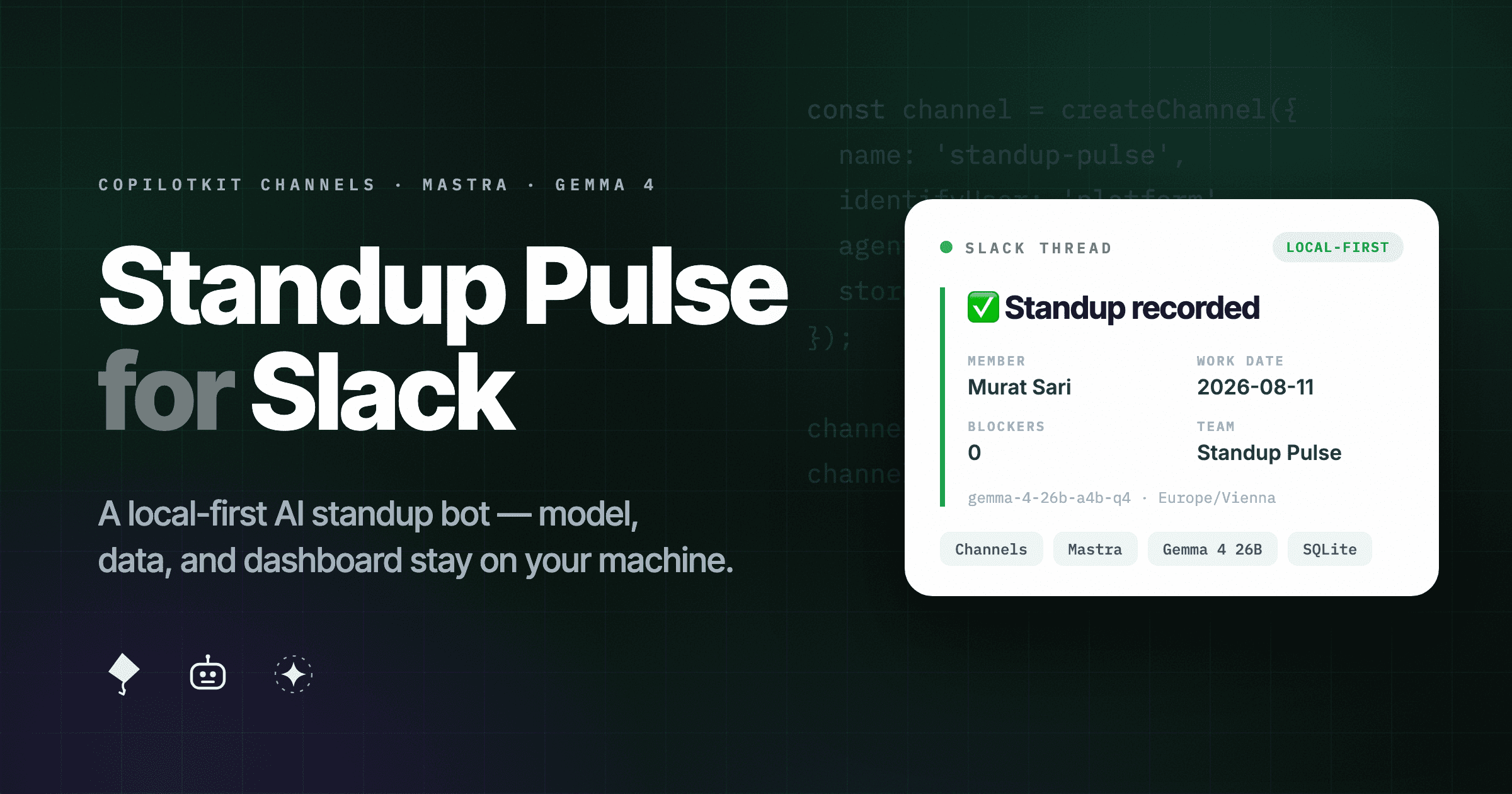
export function StandupReceiptCard({ receipt }: { receipt: StandupReceiptViewModel }) { return ( <Message accent="#16A34A"> <Header>{receipt.updated ? '✅ Standup updated' : '✅ Standup recorded'}</Header> <Fields> <Field>{`**Member**\n${receipt.member.displayName}`}</Field> <Field>{`**Work date**\n${receipt.date}`}</Field> <Field>{`**Blockers captured**\n${receipt.blockerCount}`}</Field> </Fields> <Context>{`${receipt.team.name} · ${receipt.team.timeZone}`}</Context> </Message> );}The project also uses Slack.Block.DataVisualization for the participation trend. Slack documents the native data visualization block for line, bar, area, and pie charts, so the bot can post a structured chart rather than generating and hosting an image. Portable cards live in standup-cards.tsx; the Slack-only chart is isolated in team-pulse-chart.tsx.
Separating model input from application authority
The write tool accepts the standup content the model extracted:
yesterdaytodayblockers
It does not accept an actor ID, team ID, channel ID, timezone, or work date. Those values come from verified Channel context and server-side configuration.
const submitStandup = defineChannelTool({ name: 'submitStandup', description: 'Record yesterday, today, and blockers for the authenticated Slack member. Identity and work date come from trusted Channel context.', parameters: SubmitStandupInputSchema, async handler(input, context) { const actor = trustedActorFrom(context); if (!actor) { return 'A human Slack message is required to record a standup.'; } const receipt = await domain.submitStandup(actor, input); if (!receipt) { await context.thread.post( 'I could not match your Slack account to an active roster member. Ask an admin to link it in Standup Pulse.', ); return 'The authenticated Slack actor is not linked to an active roster member; nothing was stored.'; } await context.thread.post(<StandupReceiptCard receipt={receipt} />); return `Recorded ${receipt.member.displayName}'s standup for ${receipt.date} with ${receipt.blockerCount} blocker(s).`; },});This is the primary trust boundary. The model may misunderstand prose, but it cannot submit a standup as another Slack user or select an arbitrary work date. The domain layer maps the provider actor to an active roster member and calculates the work date using the team's timezone. If no mapping exists, the tool stores nothing and instructs the user to ask an administrator to link the account.
Slack documents that its Events API can retry an event when delivery is not acknowledged. Standup Pulse therefore persists the provider event identity and enforces unique database indexes for both the source event and the member's standup on a work date. A redelivery becomes an idempotent update path rather than a duplicate record.
The full tool implementation is in standup-tools.tsx, with the database constraints in schema.ts.
How Mastra runs the agent
Mastra is the agent execution layer in this system. It does not receive Slack webhooks, manage Slack thread subscriptions, or own standup data. Channels handles the Slack conversation and provider delivery; Mastra gives the local process an agent loop with instructions, a model, typed read tools, validated request context, and execution traces.
Standup Pulse defines one agent shape with createStandupPulseAgent(...). The definition supplies the local Gemma model, concise operating instructions, maxRetries: 0, and a Zod schema requiring trusted actor, team, and timezone context. Its Mastra tools read through DomainReadService; they never query from IDs invented by the model. The tools receive those values through Mastra's request context, whose schema is validated before execution.
The runtime deliberately creates two Mastra instances from that definition:
| Surface | Mastra tools | Additional interface tools | Output |
|---|---|---|---|
| Slack thread | getTeamPulse, listBlockers |
Channels adds submitStandup, renderTeamPulse, renderBlockerDigest |
Native Slack messages and Block Kit |
| Angular dashboard | getMyStandup, getTeamPulse, listBlockers, generate_a2ui |
None from Channels | Copilot chat text or a structured A2UI view |
That separation is important. The Slack-facing Mastra agent is created with includePersonalTools: false, so the synthetic read-only context used to run a thread cannot call getMyStandup. Team-level reads remain available. The Channels layer separately injects the Slack-specific write and rendering tools, and those tools receive the authenticated human through context.actor.
The relevant runtime wiring is:
const channelMastra = await buildMastra( 'standup-pulse-api-channel', createStandupPulseAgent({ model, readService, includePersonalTools: false, }),);const channel = createStandupChannel({ name: channelName, domain: new StandupChannelDomainAdapter(service, actorResolver), agent: (threadId) => getLocalAgent({ mastra: channelMastra, agentId: STANDUP_PULSE_AGENT_ID, resourceId: `channel:${threadId}`, requestContext: trustedRequestContext('channel-readonly', timeZone, threadId), }),});getLocalAgent(...) from @ag-ui/mastra adapts the registered Mastra agent to an AG-UI agent that Channels can run. The resourceId is derived from the Channel thread, keeping each Slack conversation distinct. The request context supplies the team timezone and thread ID to read tools without placing them in the model's tool arguments.
The string channel-readonly deserves special attention: it is a non-human label for the Mastra read context, not the identity permitted to write a standup. When submitStandup runs, authority comes from the Channel tool's verified context.actor.id; StandupChannelDomainAdapter then resolves that provider actor against the local roster. Keeping these two contexts separate prevents an implementation convenience in the agent runtime from becoming an authorization shortcut.
For a Slack turn, the responsibility chain is therefore precise:
- Channels delivers the normalized Slack message and calls the AG-UI adapter for that thread.
- The adapter runs the Mastra agent with its instructions, local model, read tools, and the tools supplied by Channels.
- Gemma selects a tool and produces only the arguments allowed by its schema.
- Mastra executes read tools against the local domain service; a selected Channel tool executes through the trusted Slack context.
- Mastra emits the resulting text and tool events through AG-UI, and Channels posts the final native response to Slack.
Mastra infrastructure is local as well. Each instance uses the project's LibSQL-backed storage and observability configuration, while sensitive standup fields are filtered before traces are persisted. The agent definition is in standup-agent.ts; the two-instance wiring is in runtime-integration.ts, and the managed Channel adapter lives in channel-runtime.ts.
Running the agent on a local Gemma model
Both Mastra instances use the same locally served model. It is Unsloth's gemma-4-26B-A4B-it-GGUF, using the UD-Q4_K_M quantization and served by llama.cpp. This is Gemma 4's mixture-of-experts variant: the model card reports 25.2 billion total parameters and 3.8 billion active parameters per inference pass. llama-server exposes an OpenAI-compatible HTTP API on loopback, and the application connects through the AI SDK's createOpenAICompatible provider:
const provider = createOpenAICompatible({ name: 'llamaCpp', baseURL: config.baseUrl, ...(config.apiKey ? { apiKey: config.apiKey } : {}), includeUsage: true, supportsStructuredOutputs: true, fetch: createLlamaCppFetch(fetchImplementation), transformRequestBody: (body) => ({ ...body, temperature: typeof body['temperature'] === 'number' ? body['temperature'] : config.temperature, top_p: config.topP, top_k: config.topK, chat_template_kwargs: { enable_thinking: config.thinking }, reasoning_effort: 'none', parallel_tool_calls: false, max_tokens: typeof body['max_tokens'] === 'number' ? body['max_tokens'] : config.maxOutputTokens, }),});return provider.chatModel(config.modelId);The checked-in startup script configures a single inference slot, a 131,072-token maximum context, GPU-layer offload, Flash Attention, and MTP speculative decoding. That is configuration, not a claim that this application needs or has validated 131,072 useful tokens; standup turns are intentionally short.
$ tools/model/start-local-model.sh q4The model card documents the Q4 artifact and MTP drafter. For OpenAI-style tools, llama.cpp's function-calling guide recommends a tool-aware chat template and --jinja; it also warns that aggressive KV-cache quantization can reduce tool-calling quality.
One compatibility issue was specific to the server/client combination used during this build: a llama.cpp response briefly exposed function.arguments as an object where the OpenAI-compatible client expected a JSON string. The local adapter normalizes both complete JSON responses and server-sent event chunks before the AI SDK validates them. That workaround is retained in local-model.ts rather than presented as a universal llama.cpp requirement.
Checking the local model before trusting it
A polished demo is not evidence that a local model will choose the right tool every time. The current repository takes a deliberately smaller, honest step: it includes an endpoint smoke check and an opt-in live integration test rather than presenting a single successful run as a full evaluation suite.
The smoke script verifies that llama.cpp is healthy, the expected model alias and context size are loaded, MTP speculative decoding is active, and a simple team-pulse request selects getTeamPulse:
$ RUN_LOCAL_MODEL_TESTS=1 node tools/model/smoke-local.mjsThe API test then runs the real Gemma model through the Mastra agent, checks that the trusted work date comes from server context, and confirms that the stored team-pulse tool is actually called:
$ RUN_LOCAL_MODEL_TESTS=1 pnpm nx test api --skip-nx-cacheThe ordinary unit tests cover the other side of the boundary: tool schemas, verified Slack identity, idempotent writes, and the rule that actor, team, timezone, channel, thread, and date values must not become model-controlled arguments. These checks are useful release guards, but they are not a statistically meaningful model benchmark. Before treating the bot as critical infrastructure, I would add a repeatable multi-turn evaluation corpus and explicit promotion thresholds.
The relevant entry points are smoke-local.mjs and live-model.spec.ts.
Using the agent definition in the Angular dashboard
The administration surface is an Angular 22 application connected to the same backend through CopilotKit. It uses a separate Mastra instance built from the same Standup Pulse agent definition, with personal read tools and A2UI enabled. The CopilotKit Angular package is built around AG-UI and provides the chat surface used here.
The dashboard also experiments with A2UI, a declarative generative-UI approach in which the agent emits a structured surface composed from a registered component catalog. That is useful for exploratory summaries in a browser. It is intentionally separate from the narrow Slack write path, where predictable cards are more valuable than open-ended interface generation.
That separation came from experience. During development, one A2UI request entered a long generation loop and had to be terminated, while the shorter Slack tool decisions remained easier to constrain. Sharing an agent definition does not require every interface to grant the model the same degree of control.
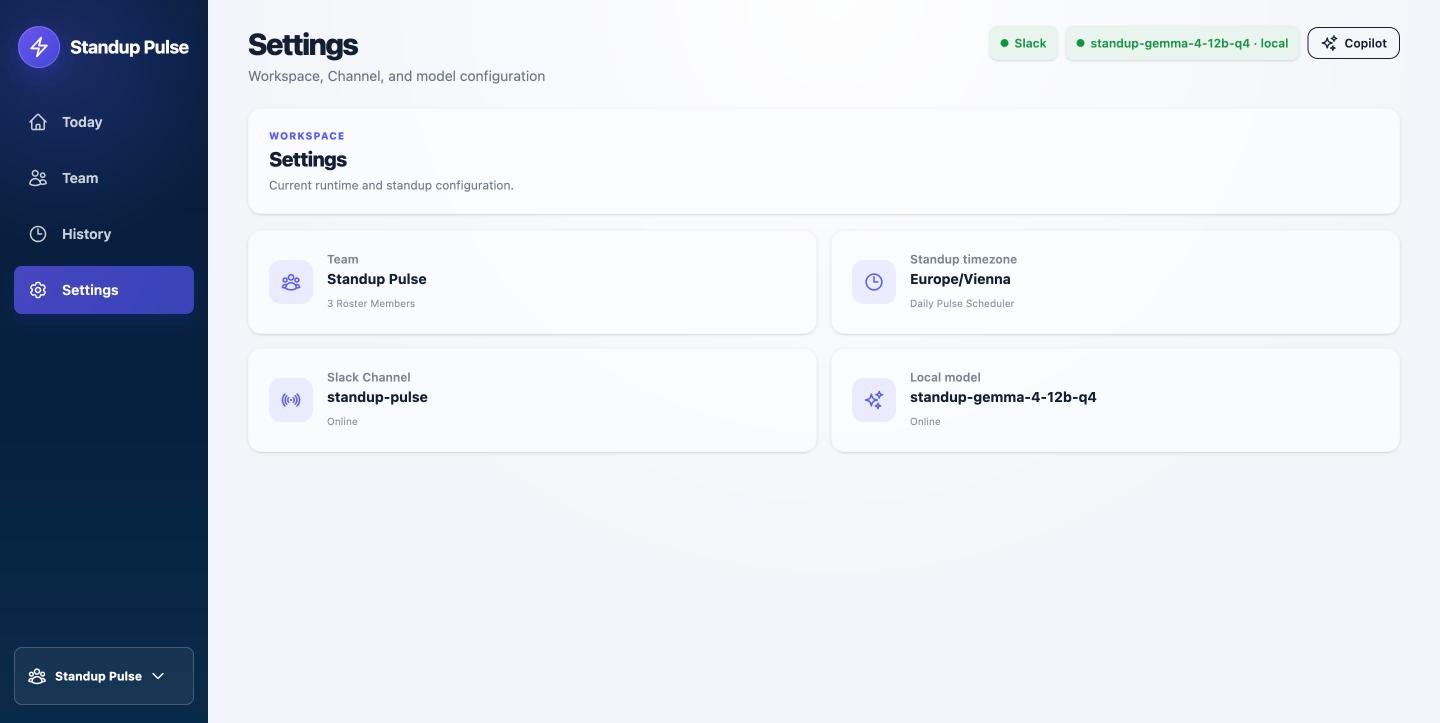
The settings page makes operational state visible. The API can remain available while the local model reports a degraded state, and the dashboard shows the Channel and model independently:
Operational tradeoffs
This architecture removes the need to host model inference or standup storage in a cloud service, but it does not remove operations:
- The local machine must stay awake and keep the Node process and llama.cpp running.
- The managed Channel remains an external dependency and is subject to the current CopilotKit plan limits.
- Model artifacts, memory use, startup time, and tool reliability depend on the selected quantization and hardware.
- Smoke and live integration checks should be repeated when the model, prompt, schemas, llama.cpp build, or sampling configuration changes.
- Scheduled proactive nudges use a separate Slack Web API path; they are not evidence that the model should control scheduling or recipient identity.
Those are acceptable tradeoffs for this experiment because the goal is control and inspectability, not zero maintenance.
Running the project
The source, setup files, and tests are all in Soverius-AI/standup-pulse. After cloning it and installing the dependencies, start the local model in one terminal and the dashboard with its API dependency in another:
$ pnpm install$ tools/model/start-local-model.sh q4$ pnpm nx serve dashboardThe dashboard runs at http://localhost:4200, the API at http://127.0.0.1:3000, and the model at http://127.0.0.1:8080. The first model start may fetch a multi-gigabyte GGUF and its MTP drafter. Channel setup additionally requires the pinned CLI flow shown earlier, a CopilotKit Intelligence project, and permission to install an app in the target Slack workspace.
For the exact model flags, artifact manifest, and health check, read start-local-model.sh, manifest.mjs, and smoke-local.mjs. The two commands above are a development path, not a production deployment guide.
Stay Updated
Get new essays and workshop announcements in your inbox.


Comments
No comments yet. Be the first.