


Language models in the cloud are powerful, but they cost money, send your data across someone else's servers, and don't know your own knowledge. There is another way: with Gemma 4, an instruction-tuned on-device model runs directly in the browser — no server, no API key, and without any questions or document contents ever reaching a model server. Combine it with Retrieval-Augmented Generation, and it answers questions about your own documents — and cites its sources, too. This article builds such a system piece by piece: small enough to understand, and complete enough to reproduce.
Why AI in the Browser?
Most AI applications follow the same pattern: the app sends a request to a cloud service, a large model does the computation there, and the answer comes back. That's convenient, but it has three catches. First, every request costs money. Second, potentially sensitive data leaves your own premises. And third, the model knows neither your internal content nor anything that happened after its training cutoff.
Recently, a serious alternative has emerged. Modern, compact models run directly on the end device: in the browser, via the graphics card. The download is a one-time affair; after that, the actual inference runs locally. No ongoing costs, maximum data minimization. What was missing until now was a model small enough for the browser and at the same time good enough for real tasks. Gemma 4 E2B closes this gap.
The second piece of the puzzle is Retrieval-Augmented Generation, or RAG for short [1]. Instead of letting the model guess, you retrieve matching passages from your own knowledge base at runtime and present them to the model as context. The model then answers based on this evidence: up to date, traceable, and far less prone to fabrication. Both together — a local model and local knowledge — yield an assistant that runs entirely in the browser.
Gemma 4: A Language Model for the Edge Device
Gemma 4 is the open model family from Google DeepMind [2], released on April 2, 2026, under the permissive Apache 2.0 license. The family comprises five sizes, from the tiny E2B to the 31-billion-parameter model. For the browser, we're interested in the smallest variant, Gemma 4 E2B: roughly 2.3 billion effective parameters, a context window of 128,000 tokens, and the ability to process not only text but also images and audio. The "E" stands for "effective": thanks to a technique called Per-Layer Embeddings, the number of parameters active at runtime is smaller than the total count, which saves memory [3]. Like all modern language models, Gemma is built on the Transformer architecture [4]. Depending on quantization, backend, and context budget, E2B runs on devices with several GB of available memory.
For RAG, the small model is in fact a good fit, because what matters here is not encyclopedic world knowledge but understanding the supplied context. Two of Gemma 4's innovations help concretely. First, the family natively supports the system role for the first time: the instruction "Answer exclusively based on the context" can be cleanly separated from the actual user text. Second, there is a switchable thinking mode. For factually faithful, well-sourced answers, we leave it disabled.
That is precisely what's decisive for RAG: with precise details such as an OpenSSL version number, a CVE identifier, or a date, even good models tend to hallucinate, because they only remember approximately. Present the model with the cited passage, and vague recollection turns into a verifiable quotation. This is exactly where RAG shows its worth: the knowledge comes from our corpus, not from the model's memory.
The Gemma 4 Family at a Glance
- E2B: ~2.3 billion effective parameters, 128K context, text/image/audio. For smartphones, laptops, and the browser.
- E4B: ~4.5 billion effective parameters, 128K context, text/image/audio. For laptops with ~8 GB RAM and up.
- 12B (Unified): ~12 billion parameters, 256K context, text/image/audio (encoder-free). For laptops and servers.
- 26B A4B: Mixture-of-Experts, 25.2 billion total / 3.8 billion active, 256K context. Fast as a 4-billion-parameter model.
- 31B: dense model, 30.7 billion parameters, 256K context. For workstations and servers.
All models: Apache 2.0 license, over 140 languages, native function calling, and a configurable thinking mode. All sizes on Hugging Face: https://huggingface.co/google
Why Gemma 4 Exists and Who Pays for It
Training a model of this caliber costs millions. So why does Google give it away? Gemma emerges from the same research and technology as the closed Gemini models [2], and with it Google pursues a deliberate dual strategy: the Gemini models remain proprietary and are marketed via API and products, while the open Gemma family binds developers to Google's own ecosystem. The calculation recalls Red Hat with Linux: give away the core, earn money on support, hosting, and integration. Those who prototype on Gemma often end up on Google Cloud's Vertex AI for production operations; that's where the money flows back.
Development is therefore funded by Google DeepMind, refinanced not through license fees (the models are released under the free Apache 2.0 license for the first time [2]) but through cloud revenue, the sale of compute time (TPUs), and the halo effect on the rest of the portfolio. The Gemma family counts over 400 million downloads, and the same compact technology that lets E2B run in the browser also powers on-device features in Android. For us as developers, what counts above all is the result: a ready-to-use model with no usage fees, under the commercially permissive Apache 2.0 license.
Under the Hood: Mixture-of-Experts and Speculative Decoding
Two of the family's architectural ideas are worth a closer look, even though it's the small E2B doing the work in the browser. The first is Mixture-of-Experts (MoE), visible in the 26B A4B model. Instead of computing the entire network for each token, every layer here contains many specialized "experts," and a small gating network selects only a handful of them per token: in Gemma 4, eight out of 128 experts plus one always-active shared expert. As a result, only around 3.8 of 25.2 billion parameters are active per compute step [2]. The result is a model that computes almost as fast as a 4-billion-parameter model but answers like a much larger one.
The second idea is speculative decoding, which Gemma 4 implements as Multi-Token Prediction (MTP) [5]. Normally, a language model generates one token after another. With speculative decoding, a small, fast "draft model" proposes several tokens at once, which the large target model then verifies in a single pass; if a proposal doesn't fit, the target model itself supplies the correct token, and the draft continues from there. Gemma 4 ships a dedicated draft model with every model, one that shares the embedding table and final activations with the target model. The answer is therefore bit-for-bit identical to the one without acceleration, only much faster [5]. For latency-critical and on-device scenarios in particular, that's worth a great deal. A side note: for MoE models such as 26B A4B, verifying the proposals can require loading additional expert weights from memory, so the gain shrinks at batch size 1 [5]. In our browser example, we stick with standard generation; the MTP checkpoints are the next lever when speed matters.
The Architecture of the Example
The example project splits into two halves that run at different times (Fig. 1). The offline pipeline runs once on the command line with Node.js: it reads a corpus of Markdown files, breaks it into sections, computes a vector for each section, and writes everything to a compact JSON file. The online half is an Angular application that loads this file once and then handles everything else in the browser: it embeds the question, finds the most similar sections, builds a context from them, and lets Gemma 4 formulate an answer.
We deliberately left out everything a larger system would additionally have: hybrid search and reranking. What we did build in, by contrast, is query rewriting that resolves follow-up questions, plus a memory for the conversation history. For retrieval, we deliberately rely on the same technology as in the backend (PostgreSQL with the pgvector extension), except that the database runs in the browser thanks to WebAssembly. This keeps the core of RAG visible, and the step into production is small. That is precisely the goal: not the most complete example, but the most understandable one.
To keep the interface responsive, the vector database and both models (the embedder and the language model) each run in their own Web Workers, separate from the UI thread (Fig. 2). The rest is a single Angular page with several eye-catchers: a chat window with an expandable chain of thought, a token counter, and a context inspector.
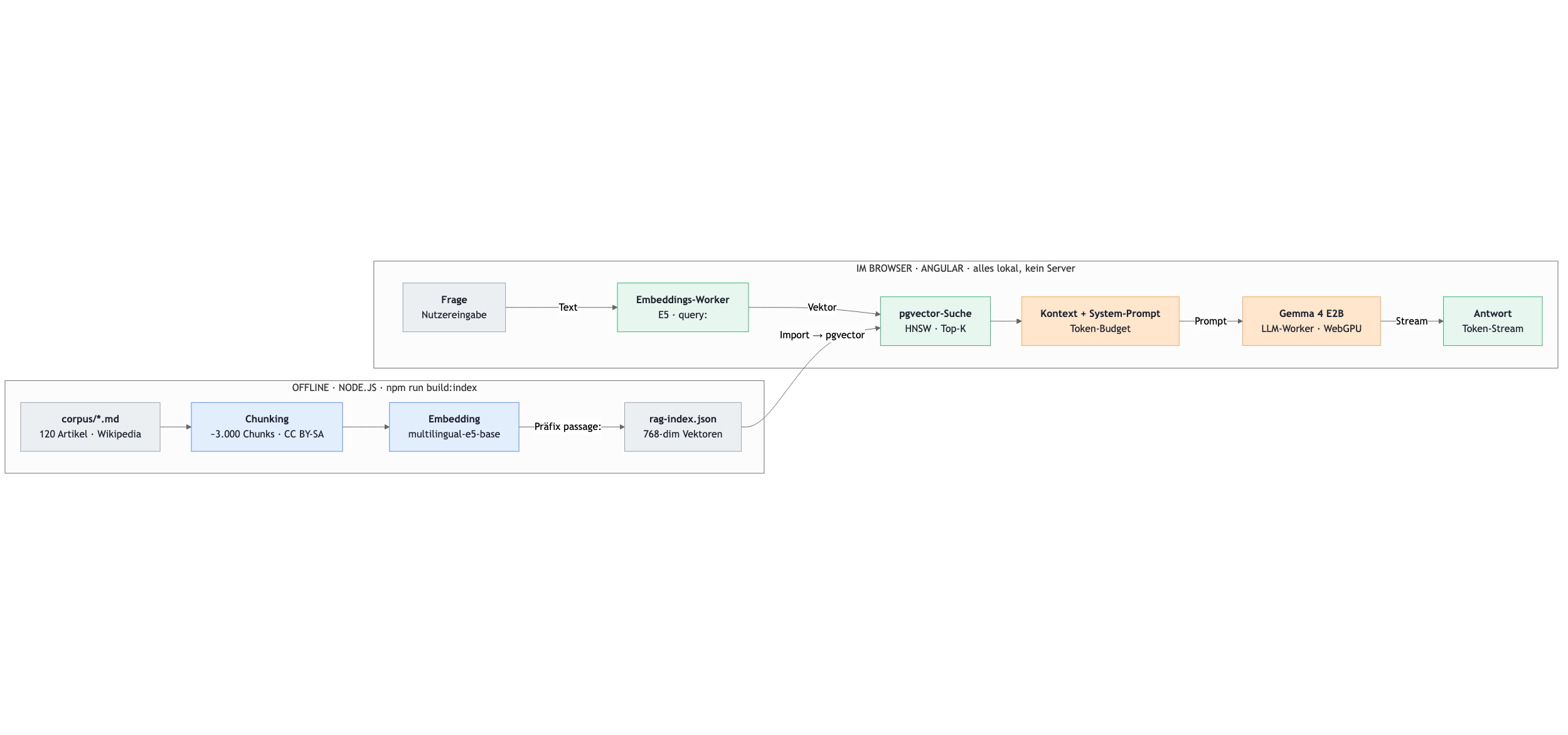
Fig. 1: The two halves of the application. Offline, a vector index is created from Markdown; online, embedding, search, and generation run entirely in the browser.
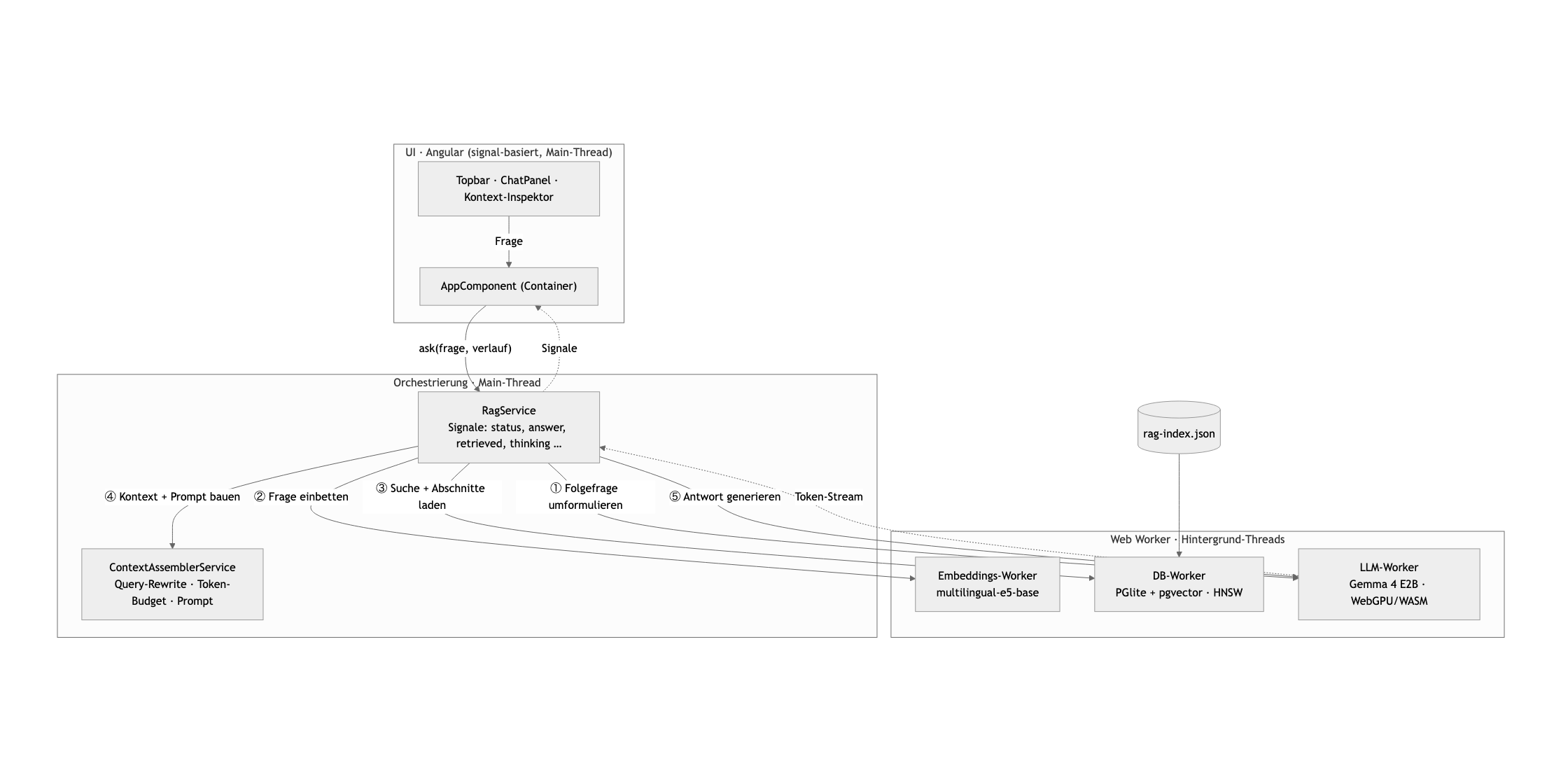
Fig. 2: Data flow in the browser. The RagService orchestrates four services and three Web Workers (vector database, embedder, and Gemma 4); the DB worker loads the precomputed index. The UI stays thin and reacts only to signals.
Step 1: From Documents to a Vector Index
Before anything can be searched, the knowledge has to be prepared. The demo corpus is a German-language computer science knowledge archive: roughly 120 Wikipedia articles (CC BY-SA 4.0) [6] on famous software bugs and security incidents (Heartbleed, Ariane 5, Stuxnet ...), on programming languages, algorithms, and data structures, on cryptography and network protocols, as well as on the pioneers of computer science. Such content is rich and a good RAG benchmark: it is full of precise facts such as version numbers, CVE identifiers, complexities, and years — exactly the kind of thing a language model is happy to get wrong from memory.
The first step is chunking: long articles are broken into smaller sections so that later only the relevant parts make it into the prompt. We use heading-based chunking: each section under a heading becomes a chunk, and the heading path (e.g., "SQL Injection > Countermeasure Prepared Statements") travels along as provenance. Sections that are too long are split sentence by sentence according to a character budget. This turns the 120 articles into roughly 3,000 chunks.
Each chunk is then translated into a vector, an embedding. The model is trained so that texts with similar meaning lie close together in vector space, even when they use different words. That is exactly what makes the later semantic search possible. The idea of matching questions and passages via dense vectors rather than keywords goes back to Dense Passage Retrieval [7]. As the embedding model, we choose multilingual-e5-base, a multilingual model [9] trained according to the E5 recipe [8]: German questions find German passages; at 768 dimensions it is somewhat larger than the small variant, but more accurate in return — and still small enough to run almost without delay in the browser.
Two details decide quality. First, the E5 models expect a prefix: passages are introduced with passage:, questions later with query:. Second, we normalize the vectors to length 1, the standard for cosine similarity, which pgvector works with later. Listing 1 shows the heart of the pipeline.
Listing 1: The offline pipeline embeds all chunks in batches and writes a compact index (here roughly 3,000 chunks, about 24 MB).
// pipeline/embedding.ts: embedder based on multilingual E5export async function createEmbedder() { const extract = await pipeline('feature-extraction', 'Xenova/multilingual-e5-base'); return async (texts, prefix) => { // mean pooling + normalization => unit-length vectors const output = await extract(texts.map((t) => prefix + t), { pooling: 'mean', normalize: true }); return output.tolist(); };}// pipeline/build-index.ts: chunk the corpus, embed it, and write it as JSONconst chunks = loadChunks(CORPUS_DIR); // Markdown -> chunks (headings)const embed = await createEmbedder();const vectors = [];for (let i = 0; i < chunks.length; i += 64) { // gently, in batches const vecs = await embed(chunks.slice(i, i + 64).map((c) => c.content), 'passage: '); vectors.push(...vecs);}writeFileSync(OUTPUT, JSON.stringify({ embeddingModel: 'Xenova/multilingual-e5-base', dim: 768, chunks: chunks.map((c, i) => ({ ...c, embedding: vectors[i] })),}));The result is a single file, rag-index.json. For each chunk it contains the text, the heading path, the link to the Wikipedia article, a rough token estimate, and the 768-dimensional vector. The link provides real grounding: every statement can be traced back to its source. This file is the import source for our vector database in the browser (Step 2).
Step 2: Vector Search in the Browser
On startup, the app imports the index once into a real vector database in the browser: PostgreSQL with the pgvector extension [10], executed via PGlite (https://pglite.dev) [11] — PostgreSQL compiled to WebAssembly. The vectors reside in a table column of type vector(768), an HNSW index [12] (Hierarchical Navigable Small World) accelerates the search, and the data is persisted in IndexedDB, so the import is only needed on the first visit.
When a question comes in, it is embedded with the same E5 model (prefix query:, in a Web Worker). The search itself is then a perfectly ordinary SQL statement using pgvector's cosine operator <=>: exactly what you would also write on a server, except that the database runs locally in the tab (Listing 2).
Listing 2: Retrieval as a SQL query: pgvector finds the most similar chunks via the <=> operator and an HNSW index.
// src/app/workers/db.worker.ts: nearest-neighbor search via pgvectorasync function search(queryVec: number[], topK: number): Promise<Retrieved[]> { const emb = `[${queryVec.join(',')}]`; const { rows } = await db.query( `SELECT id, content, section_path, url, token_count, 1 - (embedding <=> $1::vector) AS similarity FROM chunks ORDER BY embedding <=> $1::vector -- cosine distance, HNSW index LIMIT $2`, [emb, topK], ); return rows.map((r) => ({ chunk: { /* ... */ }, score: Number(r.similarity) }));}The charm: it's the same technology as in the backend (PostgreSQL + pgvector), only without a server. Anyone who'd rather lift the index from prototype to production can run the same SQL code against a real Postgres instance. For our ~3,000 chunks, the search responds in a few milliseconds.
Step 3: Keeping an Eye on the Context Window
The top hits now move into the prompt — but not all of them. A model's context window is limited, and even though Gemma 4 E2B holds 128,000 tokens, it's wise to allocate only a tight budget per request: this saves compute time and keeps the model focused. Too much context can even hurt: models demonstrably make worse use of information in the middle of long inputs — the "Lost in the Middle" phenomenon [13]. From the best hits, we load the entire associated section in each case — not just the individual chunk — and use it to fill a fixed budget until it's exhausted. The system prompt and the question count toward it as well.
That is exactly what the application's context inspector makes visible (Fig. 3). A stacked bar shows how the budget is distributed across the system prompt, conversation history, question, loaded sections, and free space; a token counter names the occupied figure. Beside it, the inspector lists the found chunks along with their similarity score, provenance path, and a direct link to the Wikipedia article. So you not only see the answer — you can look up every statement back to its source. This "opening up" of the black box is didactically valuable: it becomes tangible that usually only a handful of chunks fit into the budget, and that the selection decisively determines answer quality.
For the token estimate, a rule of thumb suffices: in German, one token corresponds roughly to four characters. That's not exact, but it's fast and entirely sufficient for a budget display.
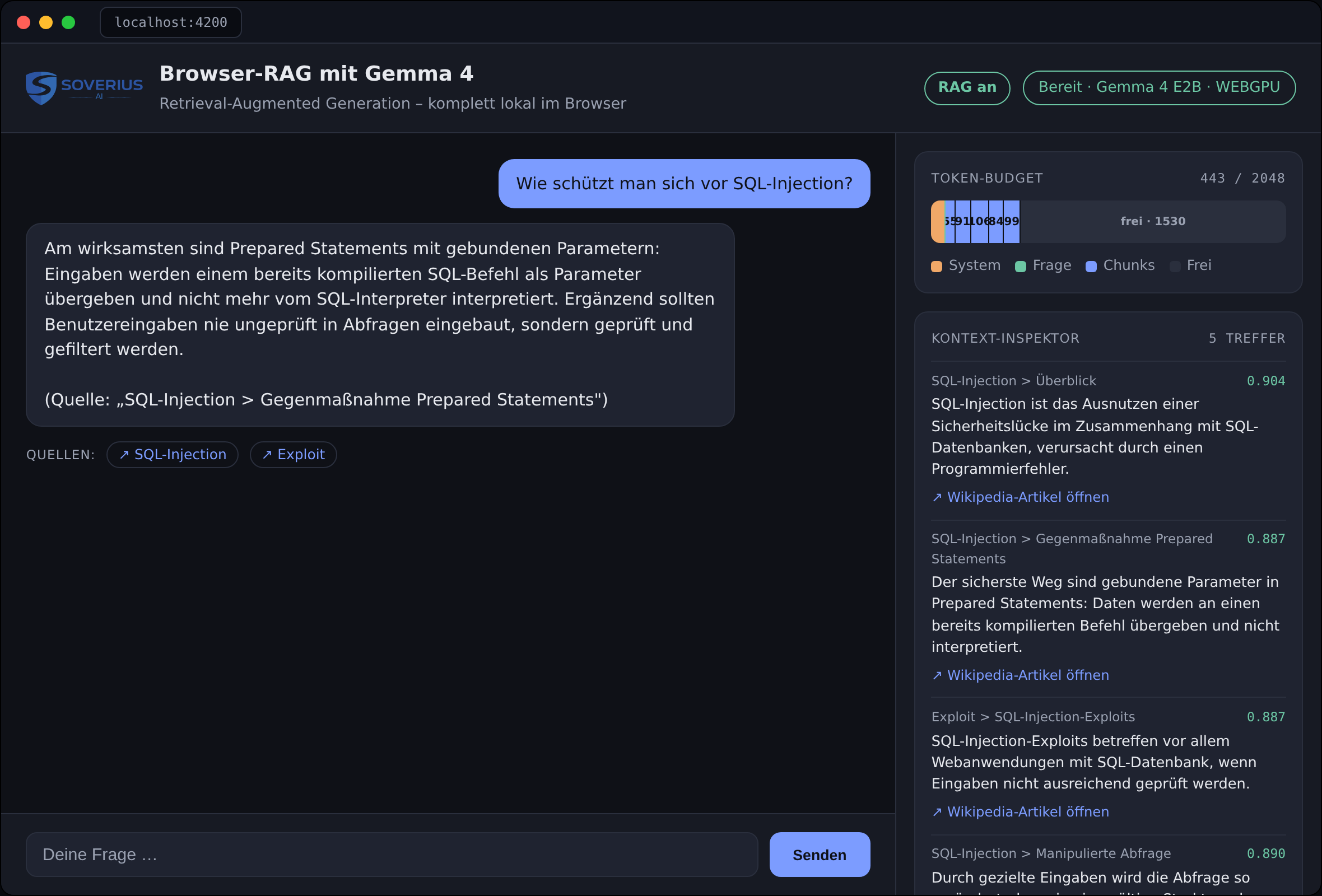
Fig. 3: The application in action (here the question "How do you protect against SQL injection?"): on the left, the grounded answer with source citation; on the right, the context inspector with the token budget and the retrieved chunks, including similarity score and a direct link to the Wikipedia article.
Step 4: Gemma 4 Answers
Now the language model enters the picture. Gemma 4 E2B is loaded via Transformers.js [14], Hugging Face's JavaScript library that runs ONNX models in the browser via the ONNX Runtime. The weights come from the repository onnx-community/gemma-4-E2B-it-ONNX [15]. We load them preferentially in the q4f16 format (4-bit weights, fp16 activations) on WebGPU [16] and fall back to the slower but universally available WASM backend if no graphics card can be addressed (Listing 3).
Listing 3: WebGPU first, WASM as a safety net: this pattern makes the app runnable on any device.
// src/app/workers/llm.worker.ts: load the model with WebGPU and a WASM fallbacktry { model = await Gemma4ForConditionalGeneration.from_pretrained(MODEL_ID, { dtype: 'q4f16', device: 'webgpu', progress_callback });} catch { model = await Gemma4ForConditionalGeneration.from_pretrained(MODEL_ID, { dtype: 'q4', device: 'wasm', progress_callback });}For the actual answer, we build messages with the roles system and user. The system prompt instructs Gemma 4 to use exclusively the provided context, to name the relevant sections, and to always give the best answer derivable from it. The tokenizer's apply_chat_template brings everything into the right format, enable_thinking: false switches off the chain of thought, and a TextStreamer returns the answer token by token, so it grows live in the interface (Listing 4). With do_sample: false we decode deterministically: the same question yields the same answer given the same context, which is desirable for a factually faithful assistant.
Listing 4: Native system role, disabled thinking mode, and token streaming: three building blocks for grounded, well-structured answers.
// src/app/workers/llm.worker.ts: stream a grounded answerconst inputs = tokenizer.apply_chat_template( [{ role: 'system', content: system }, ...history, { role: 'user', content: prompt }], { add_generation_prompt: true, return_dict: true, enable_thinking: false });const streamer = new TextStreamer(tokenizer, { skip_prompt: true, skip_special_tokens: true, callback_function: (token) => postMessage({ type: 'token', token }),});await model.generate({ ...inputs, max_new_tokens: 2048, do_sample: false, streamer });The result: the user types a question, immediately sees in the inspector which chunks were pulled, and reads the answer take shape word by word — all locally, without any call to a model server, once the app, index, and model have loaded.
Measuring Quality Before the Model Guesses
A RAG system is only as good as its retrieval. If the search finds the wrong passages, even the best model won't help. That's why it pays to test retrieval separately from the language model: quickly, cheaply, and without ever loading the large model. The measure for this is called Recall@k: for each test question, you define which chunks are relevant, and you measure whether a relevant hit appears among the first k results.
Our script verify-recall.ts does exactly that for 22 German test questions spanning the corpus. Across all ~3,000 chunks, pure vector search achieves Recall@1 of 100 percent (22 of 22 test questions): for every question, a relevant chunk is at the very top. Remarkable is how well even rephrased questions land: "Why is JavaScript called that even though it has nothing to do with Java?" lands unerringly on the right section, without the keywords matching exactly. This is the real added value of semantic search over pure keyword search.
That such a smooth result comes out here is also due to the corpus: the 120 articles cover clearly delineated topics, so the right source is usually easy to find. With closely related content — or when an exact character string such as a CVE number or a product name matters — the hit rate drops, and techniques like hybrid search (vector + keyword) or reranking become important. This is precisely why this model-free measurement is so useful: it exposes such weaknesses long before the language model comes into play.
The Counter-Test: The Same Question Without RAG
How much does retrieval really contribute? The app has a switch for this: turn RAG off, and it skips the search entirely and sends only the bare question to Gemma 4 — no context, no sources (Fig. 4). For a generality like "How do you protect against SQL injection?" the model then delivers a plausible-sounding answer from its training knowledge, but without any evidence, and the context inspector stays empty.
The difference becomes more drastic as soon as it comes to specifics: a concrete CVE number, an exact version statement (which OpenSSL versions did Heartbleed affect?), or a detail from your own holdings, possibly created only after the training cutoff. Without RAG, the model guesses or invents a plausible-looking answer; with RAG, the cited passage, complete with a link, stands right next to it. It is precisely this added value that the counter-test makes visible.
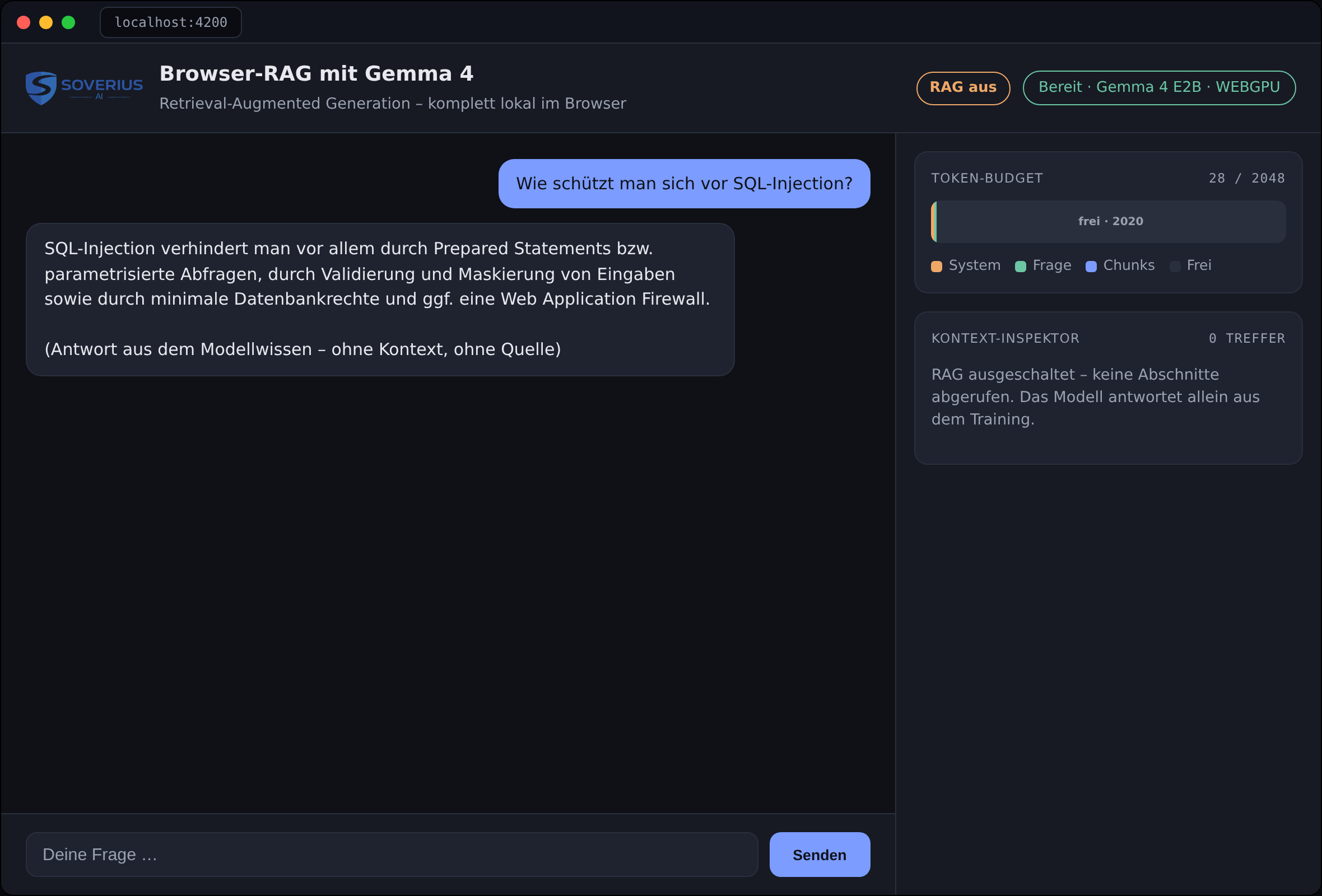
Fig. 4: Negative test with RAG switched off. The model answers from training alone, the context inspector stays empty, and there is no source citation.
Limitations and Outlook
The example is deliberately minimal, and its gaps point nicely to where the path to a production system leads. The most obvious improvement is hybrid search: combine the semantic vector search with classic BM25, and you reliably capture exact character strings such as error codes or API names as well. A second lever is reranking: a small model that re-evaluates the top candidates more carefully and thereby rescues cases where the best chunk doesn't land at the very top. Both are well known, well documented, and could be docked onto our pipeline.
Operationally, too, there are knobs to turn. WebGPU has by now arrived in Chrome, Edge, Firefox, and Safari, but it's not guaranteed on older devices or under Linux or Android; the WASM fallback is therefore mandatory. The biggest hurdle remains the one-time model download of around three gigabytes; clear progress indicators and well-thought-out caching decide the first impression (Fig. 5). And finally, E2B is a small model: for the hardest questions, a hybrid approach may make sense — one that answers simple requests locally and forwards only the toughest to a larger model.
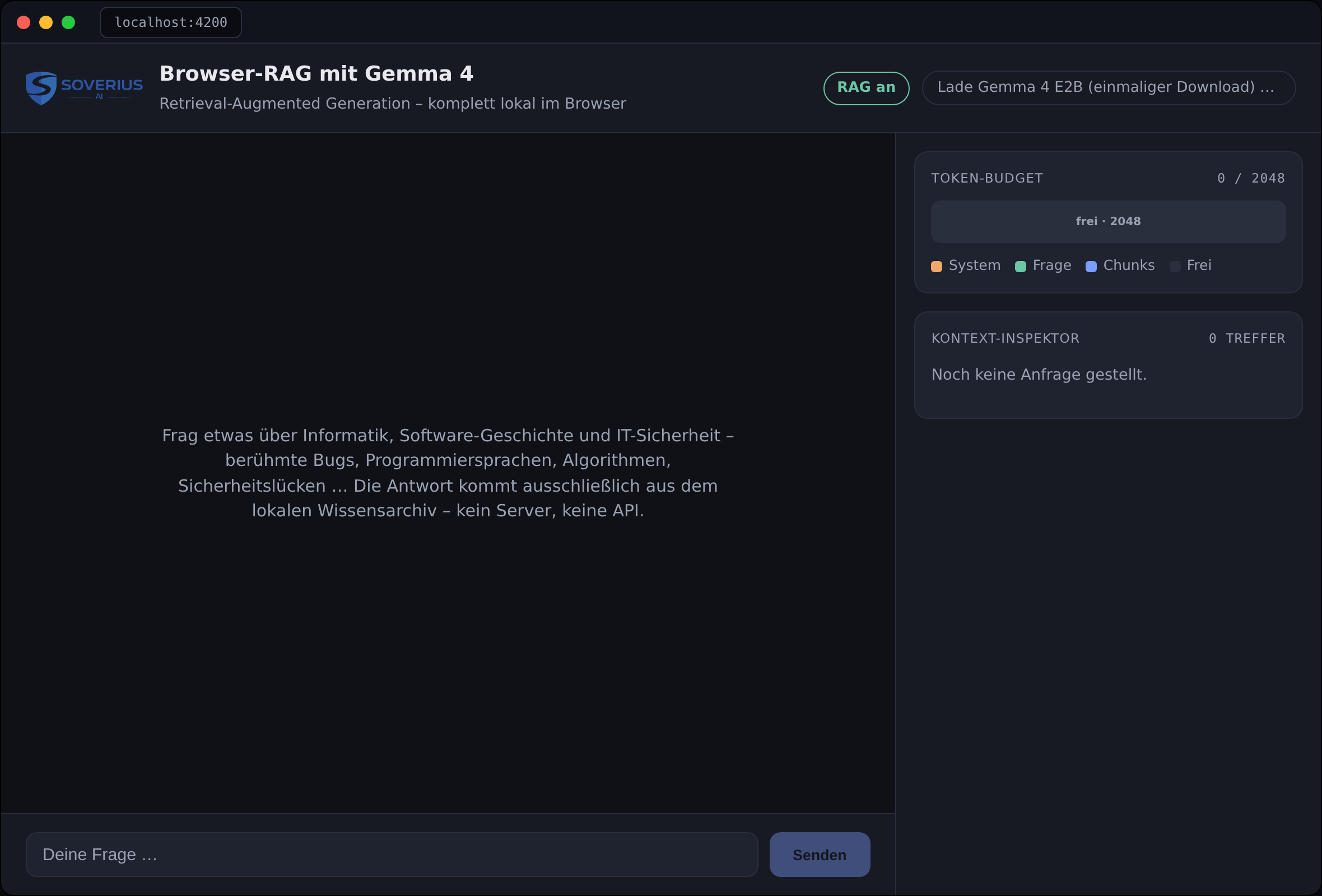
Fig. 5: Even the first launch counts toward UX. A clear status hint shows the one-time download of Gemma 4 E2B, while the interface and inspector are already visible.
Conclusion
A language model in the browser that knows your own documents can be realized with Gemma 4 E2B, Transformers.js, and WebGPU in a manageable Angular app. RAG ensures that the answers stay grounded, current, and traceable; local execution ensures that no question or document data flows out to a model server and that no usage costs arise. Once you've understood the principle through this small example, you can extend it in any direction. The best starting point is to replace the corpus with your own documents, call npm run build:index, and let the model answer in your own tab. The finished demo runs at https://soverius-ai-rag-basic.web.app, the source code at https://github.com/Soverius-AI/ai-rag-basic.
Links & References
[1] P. Lewis, E. Perez, A. Piktus et al.: "Retrieval-Augmented Generation for Knowledge-Intensive NLP Tasks." NeurIPS 2020. arXiv:2005.11401
[2] Google DeepMind: Gemma 4, announcement and model card. https://blog.google/innovation-and-ai/technology/developers-tools/gemma-4/ and https://ai.google.dev/gemma/docs/core
[3] Gemma Team, Google DeepMind: "Gemma 3 Technical Report." 2025. arXiv:2503.19786 (architectural foundations of the Gemma family: hybrid attention, Per-Layer Embeddings)
[4] A. Vaswani, N. Shazeer, N. Parmar et al.: "Attention Is All You Need." NeurIPS 2017. arXiv:1706.03762
[5] Google AI for Developers: "Speed-up Gemma 4 with Multi-Token Prediction (MTP)," speculative decoding for Gemma 4. https://ai.google.dev/gemma/docs/mtp/overview
[6] Demo corpus: roughly 120 articles from the German-language Wikipedia (CC BY-SA 4.0) on software bugs, IT security, programming languages, algorithms, cryptography, and the history of computer science. https://de.wikipedia.org
[7] V. Karpukhin, B. Oğuz, S. Min et al.: "Dense Passage Retrieval for Open-Domain Question Answering." EMNLP 2020. arXiv:2004.04906
[8] L. Wang, N. Yang, X. Huang et al.: "Text Embeddings by Weakly-Supervised Contrastive Pre-training" (E5). 2022. arXiv:2212.03533
[9] L. Wang, N. Yang, X. Huang et al.: "Multilingual E5 Text Embeddings: A Technical Report." 2024. arXiv:2402.05672
[10] pgvector: open-source vector search for PostgreSQL. https://github.com/pgvector/pgvector
[11] PGlite: PostgreSQL as WebAssembly (electric-sql). https://pglite.dev
[12] Yu. A. Malkov, D. A. Yashunin: "Efficient and Robust Approximate Nearest Neighbor Search Using Hierarchical Navigable Small World Graphs" (HNSW). IEEE TPAMI 2020. arXiv:1603.09320
[13] N. F. Liu, K. Lin, J. Hewitt et al.: "Lost in the Middle: How Language Models Use Long Contexts." TACL 2024. arXiv:2307.03172
[14] Hugging Face: Transformers.js documentation. https://huggingface.co/docs/transformers.js
[15] ONNX Community: gemma-4-E2B-it-ONNX (model + Transformers.js example). https://huggingface.co/onnx-community/gemma-4-E2B-it-ONNX
[16] W3C: WebGPU specification. https://www.w3.org/TR/webgpu/


Comments
No comments yet. Be the first.