


Stay Updated
Get new essays and workshop announcements in your inbox.
3. The Hardware
Since hardware is the main challenge, we present the recommendation and numbers first. The subsequent sections explain the reasoning.
To keep things simple, the hardware requirements are for a single developer machine. We also briefly discuss what changes when a team wants to have one hosted local LLM.
3.1 Which Memory Matters?
The developer's computer needs enough memory to hold and operate the entire LLM. It doesn't matter if the computer has 16 GB or 32 GB of RAM. That is irrelevant. What counts is the memory of the GPU, which is the VRAM.
Since developer machines are usually not optimized for gaming, their graphics cards are typically 4-8 GB. 16 GB for local LLMs is the "theoretical" minimum. To be on the safer side, we see the practical minimum at 24 GB.
It is a different story for Apple silicon MacBooks or Mac Studios. They use a unified memory architecture. The CPU and GPU share the same memory instead of using separate pools. This makes a larger part of the Mac's memory available to the model, but the operating system, coding agent, development tools, build processes, browsers, and model must all share that capacity.
Apple: Unified memory architecture
3.2 Our Minimum Configuration
For the scope of this article, we primarily recommend the Gemma 4 26B A4B model with Q4 quantization. If browsers, build processes, or other applications occupy too much memory, the 12-billion-parameter model is also possible. There is a difference in quality, but the main difference is speed. We will explain that later.
This is the minimum configuration for modern AI-assisted software development with local LLMs:
| Platform | Minimum configuration |
|---|---|
| Linux or Windows | 24 GB VRAM |
| Apple silicon | 36 GB unified memory |
Although this is enough to get started, more memory is always beneficial.
An Apple silicon Mac requires more total memory because its memory is shared by all processes. On Windows, only a subset of processes requires VRAM.
3.3 Hardware Options
More memory allows us to load larger models, use larger context windows, or leave more capacity for parallel workloads. However, memory capacity is not the only factor. GPU performance also matters.
Windows and Linux workstations can be upgraded with dedicated GPUs. For example, you could use a NVIDIA RTX PRO 4000 Blackwell.
On 15 August 2026, the cheapest offer we could find in Austria was around EUR 2,200, including 20% VAT. Second-hand RTXs are also an option. In that case, an older RTX 3090 would also be feasible.
Apple silicon Macs do not support external GPUs. Users have to consider that aspect when choosing the machine.
For an individual developer, the decision is therefore primarily between adding a dedicated GPU to a Windows or Linux workstation and choosing an Apple silicon machine with sufficient unified memory.
Hardware and models are evolving quickly. Any purchase should therefore be based on the models, context sizes, and expected workloads that the machine will actually need to support.
3.4 Team of Developers
A single machine shared by multiple developers operates on a different scale. Such a workstation needs more fine-tuned configuration for both hardware and software.
To give you an idea of the required GPU, for a feasible entry-level workstation we need something like the RTX PRO 6000 Blackwell. That one comes with 96 GB of memory.
On 15 August 2026, we found the cheapest offer in Austria to cost around EUR 15,000 including 20% VAT.
We see that as a baseline. As your team and its demands grow, you may have to add multiple graphics cards to a single machine, creating a multi-GPU rig.
The hardware costs more and is harder to set up, but our selected model also works perfectly fine on such a workstation.
4. Choosing the Right Model
Models that we can download and run are called open-weight models. Some models, like Codestral, have a license that restricts their use. Our common candidates Gemma 4 and Qwen 3 have an Apache 2.0 license, which makes them free to use in commercial settings. Since they are not just a single model, we call them model families.
A model family usually contains several variants with different parameter counts, architectures, capabilities, and memory requirements. Parameter counts are commonly expressed in billions: 12B, for example, means approximately 12 billion parameters.
The number of parameters is one of the main factors which determine the amount of memory required. We will examine this relationship in more detail in the next section.
4.1 Finding the Right Model
Hugging Face is the main platform for discovering and downloading open-weight models. It can be thought of as the GitHub of machine learning models.
Searching for a model family such as Gemma 4 returns many choices. These include the original model, instruction-tuned variants, or quantized versions.
Model names contain useful information. When we pick a model, we need to understand the different configurations and their impact.
4.2 Our Starter Model
As mentioned above, our minimum configuration uses the Gemma 4 26B A4B model:
unsloth/gemma-4-26B-A4B-it-qat-GGUF
Gemma 4 26B A4B is a mixture-of-experts model. That means only 4B parameters would be active at once during inference. That makes it significantly faster than the 12B version which has to activate all its parameters. The quality gap to 12B is much smaller than its increase in memory consumption would suggest.
If other processes require too much memory, we could also use the 12B version:
unsloth/gemma-4-12B-it-qat-GGUF
Gemma 4 also includes smaller E2B and E4B variants. We are not going to use them because they don't meet our defined requirements for software development.
The model's name reveals a lot of additional information, like its quantization and whether it is instruction-tuned. An instruction-tuned model has been specifically trained to follow user instructions.
For now, let's just say our model's quantization is Q4, which means it uses 1/4 of the original 16 bits to store a parameter's value. Using 4 bits does not mean the model's quality gets reduced at the same rate. As with video codecs, quantization can achieve a high "compression" with only a fraction of the quality lost.
The actual quantization used by Unsloth is not pure Q4. It mixes quantization levels to achieve even better quality than the pure Q4.
We leave quantization at this point. More details will follow in later articles.
What we still need to know is how much memory to provision for the model we've chosen.
5. Memory Provisioning
Two main elements determine how much memory we need for inference: the model itself and the context it must process.
The model's memory requirement is primarily determined by its parameter count and quantization. The context creates an additional memory requirement through the key-value cache, or KV cache.
5.1 Model Size and Quantization
With Q4 quantization, a model occupies only 4 bits per parameter. Our selected Gemma 4 comes with 26 billion parameters, which means we need to calculate like this:
26,000,000,000 parameters * 4 bits = 104,000,000,000 bits104,000,000,000 bits / 8 = 13,000,000,000 bytes.We calculate about 13 GB for the raw model size. There is also additional overhead related to model and quantization details. Our chosen Gemma 4 26B model file therefore has an actual size of 14.25 GB.
This accounts for the memory required by the model weights. We must still leave enough memory for the context and its KV cache.
5.2 Context Size
The context size defines how many tokens the model can work with at once. This includes more than the user's prompt. For a coding agent, the context may contain the system prompt, tools, skills, etc.
Gemma 4 26B supports a maximum context size of 256K tokens. However, supporting a context size does not mean that we must use all of it.
A 32K context is too small for our requirements. Coding agents already consume a substantial part of the context through their system instructions, tools, and other built-in features before they inspect the first source-code file.
Our version of Claude Code initially occupies about 22K tokens of the context. Given that our tasks are full-stack, we have to provision enough context for the rest.
That's why our configured context size is 128K. Using the full 256K context is possible, but it requires additional memory and is often unnecessary. We always interact with the model via a coding agent, such as Codex or Claude Code. They have built-in automatic context management and can compact the used context once it exceeds a configurable threshold.
If you use agents with a smaller initial context for local models, or the existing minimal modes in Claude Code or Codex, a 64K context is also an option.
5.2.1 The KV Cache
The context itself is not stored as a simple list of token IDs during inference.
LLMs are stateless. When a model receives the next message, it does not remember the calculations performed on previous messages. It would need to reprocess the entire conversation history for each generated token. That's what the KV cache is for. It caches the outcome of the previous messages.
The KV cache grows with the number of tokens in the context. Its memory requirement also depends on the model architecture. This architectural difference is important. Two models with similar parameter counts and model file sizes can require very different amounts of memory for the same context size.
For some models, the KV cache at a large context size can be several times larger than the model weights themselves. Such a model may fit into memory initially but run out of memory as soon as a large context is allocated.
Gemma 4 belongs to the more memory-efficient group. It combines local sliding-window attention with periodic global-attention layers. Its global layers also use unified keys and values. These architectural choices reduce the amount of memory required for long contexts.
As a result, the KV cache of Gemma 4 26B remains comparatively small relative to the model itself, even when we configure a context large enough for agentic coding.
As mentioned earlier, later articles in this series will explain the KV cache in much more detail.
5.3 Runtime Memory
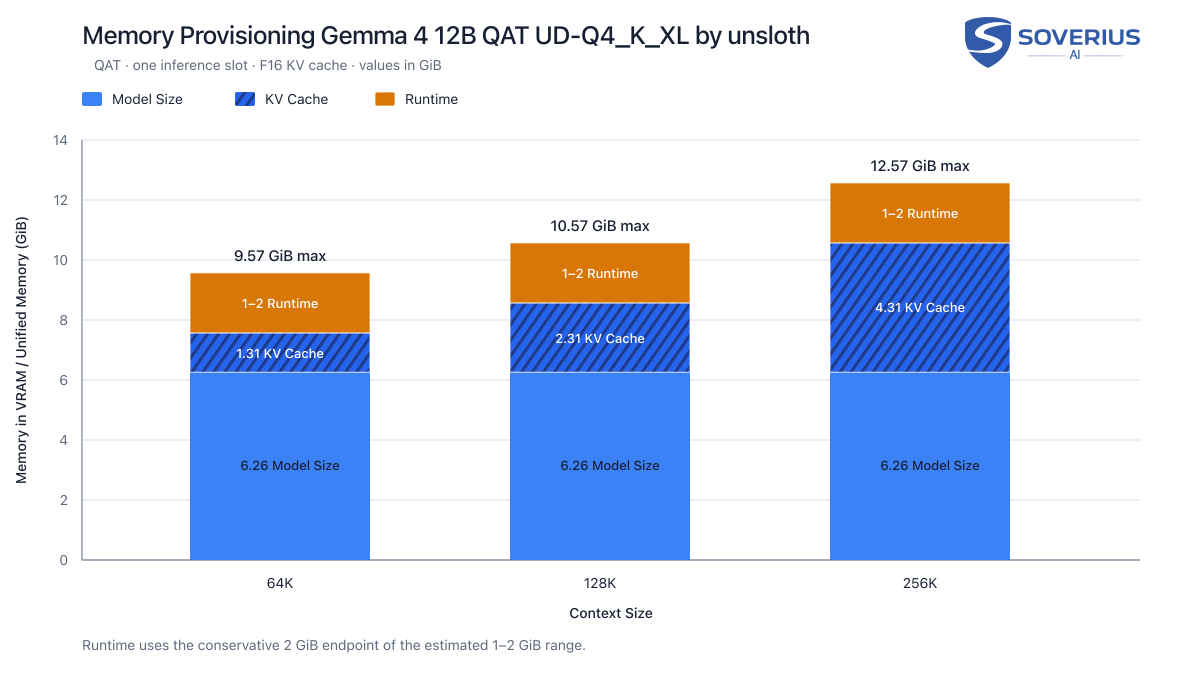
There is a memory requirement for the inference itself. If no more memory is available because of the model, the KV cache and other components, inference cannot run. That's why we usually have to reserve a safe margin of 2 GiB.
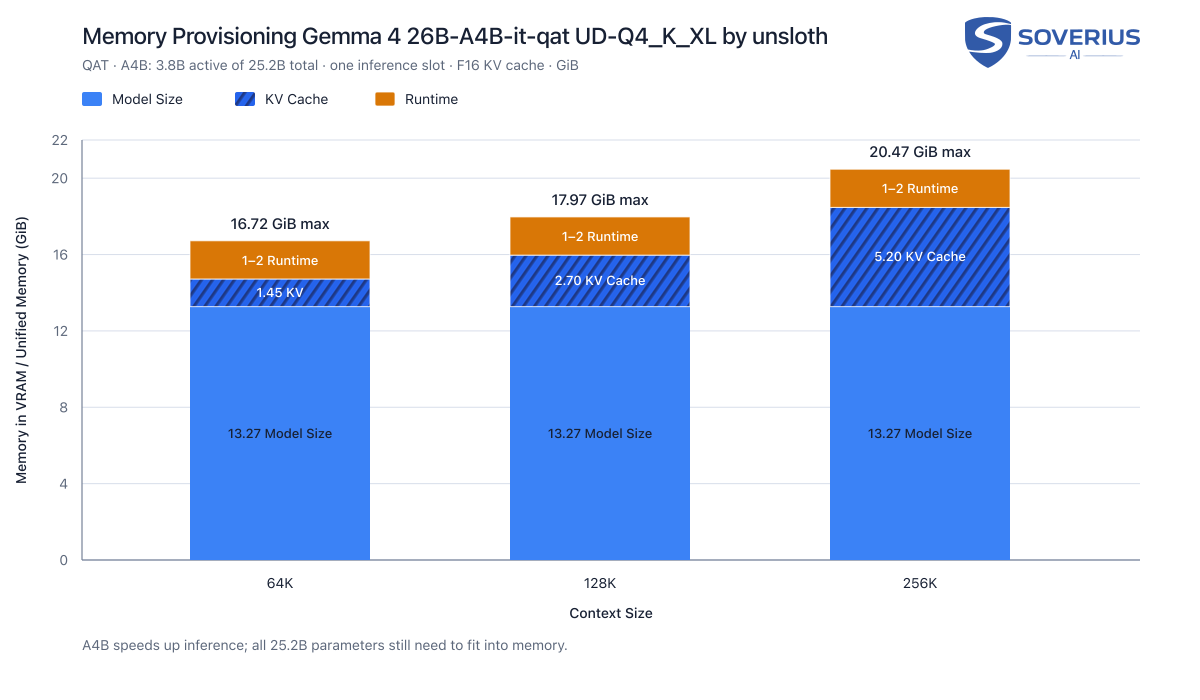
And here is the same graphic for the alternative 12B version:
Stay Updated
Get new essays and workshop announcements in your inbox.
6. Setting Up the Inference Engine (llama.cpp)
We have decided on the model family (Gemma 4), its quantization (Q4), its context size (128K), its parameters (26B) and have calculated a memory requirement of about 18 GiB. What is left is to choose an application that can host the model so that our agent can use it. That's the inference engine. In our example we use llama.cpp. Alternatives to llama.cpp exist, but we don't cover them in this starter article.
For Linux and Windows, multiple versions exist depending on your GPU backend. Because of these variations, we recommend using the prompt at the end of this article to let an agent determine the best binary build for your specific OS and hardware.
llama.cpp automatically downloads and caches a model from Hugging Face. To run our selected model on port 8888, we execute the following command:
llama-server --hf-repo unsloth/gemma-4-26B-A4B-it-qat-GGUF:UD-Q4_K_XL --port 8888 -c 131072(Note for Windows users: run .\llama-server.exe instead.)
The -c 131072 parameter sets the context size, --hf-repo selects the model, and --port defines the port on which llama-server is reachable.
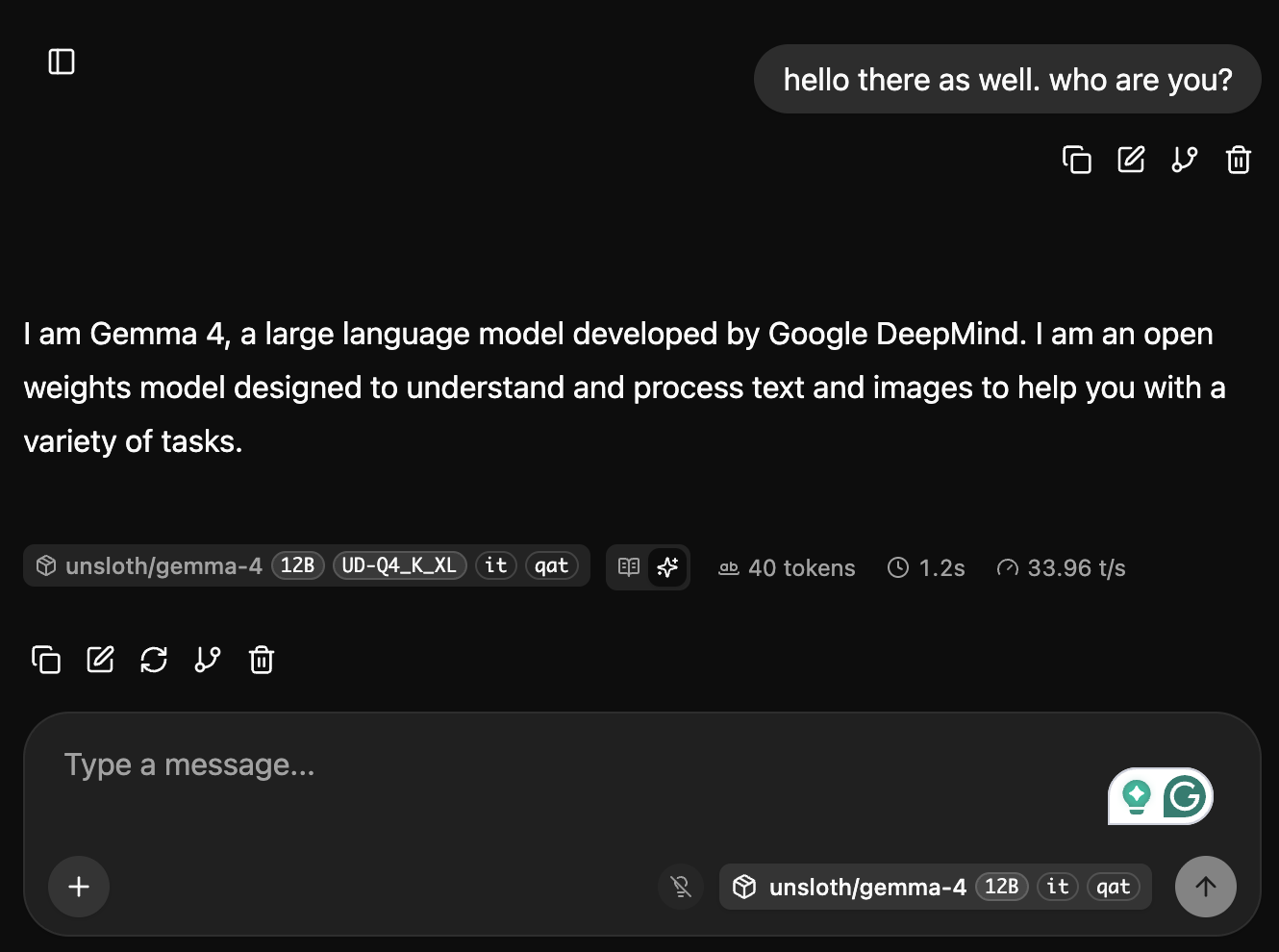
In addition to a REST endpoint for our agents, it offers a web UI, which you can reach at http://localhost:8888.
7. Setting Up the Agent
To connect our coding agent to our local model, we have to configure it properly. Generally speaking, most coding agents support local models. llama.cpp exposes the model via various protocols, including those of Anthropic and OpenAI.
That's why we can also connect to common agentic frameworks like LangGraph, Mastra, Microsoft's Agent Framework, Vercel AI SDK, and Google's ADK. The configuration will depend on the agent you are using. In the end, all of them need to know the URL and some of them the protocol as well. We usually add the context size so that agents capable of auto-compaction can use it. Auto-compaction is where the agent shrinks the session's context by summarizing or removing unnecessary conversations.
Be aware that, especially with coding agents, a lot of stuff is loaded into the context. That could be the system prompt, an MCP registration, skills, or agent-specific tools. The initial response will therefore take much longer than subsequent ones. Subsequent responses will already have the relevant data in the KV cache.
Agentic frameworks are, by design, decoupled from a specific model. Coding agents are different. Claude Code and Codex use their respective models by default but also support local models. The same is true for Pi, OpenCode, and Copilot CLI. Cursor and Antigravity are exceptions. At the time of writing, their support is limited, and they are therefore not suitable.
We used a MacBook Pro with an M1 Max and 64 GB of unified memory. The initial context was already above 22K tokens, and the first answer took 1 minute and 29 seconds, while the second took 3 seconds. In our 12B run without a mixture-of-experts architecture, the initial response took 6 minutes and the second took 6 seconds.
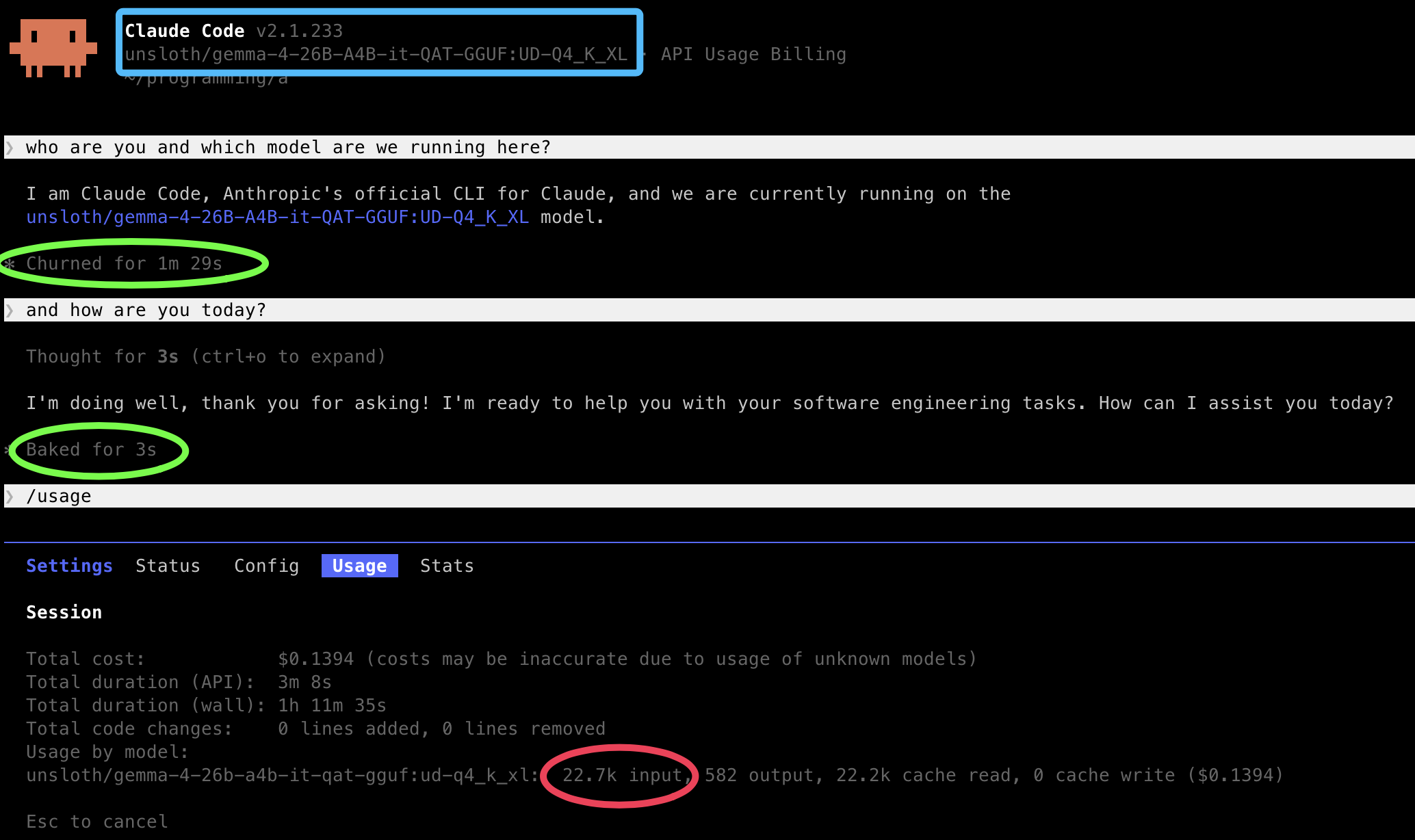
For Claude Code, the easiest way is to set up a profile with an alias.
~/.claude/profiles/llamacpp.json
{ "$schema": "https://json.schemastore.org/claude-code-settings.json", "model": "unsloth/gemma-4-26B-A4B-it-qat-GGUF:UD-Q4_K_XL", "env": { "ANTHROPIC_BASE_URL": "http://localhost:8888", "ANTHROPIC_AUTH_TOKEN": "dummy", "CLAUDE_CODE_AUTO_COMPACT_WINDOW": "131072", "CLAUDE_AUTOCOMPACT_PCT_OVERRIDE": "76" }}You can then start Claude Code with that profile via claude --settings ~/.claude/profiles/llamacpp.json.
For Codex and other agents, please consult the official documentation or ask the agent directly for help.
8. Summary
- Some local LLMs meet the demands of modern agentic software development.
- The longer local LLMs run, the greater their cost advantage over token-based APIs becomes.
- Privacy, security, and independence are gains we get from local LLMs, regardless of the costs.
- A setup on a single developer machine requires a minimum of 24 GB of VRAM or 36 GB of unified memory on an Apple silicon Mac.
- Gemma 4 26B A4B is a good model to start with.
- llama.cpp is a good choice as an inference engine to get started with.
- A workstation serving a team of developers can run a shared model but requires more configuration know-how and a larger hardware budget.
Usually, our articles come with a companion GitHub repository. This time, a single prompt is enough. Give it to your coding agent to get started:
Install the proper llama.cpp for this operating system. Then start llama-server with the model
unsloth/gemma-4-26B-A4B-it-qat-GGUF:UD-Q4_K_XL, a context size of 131,072 tokens, and port 8888. Verify that the server is available at http://localhost:8888.
Please let us know how you liked this article, what questions you have, and what your experiences with local LLMs have been.
In the next article, you will learn how we tested the local LLMs, which other models are available, and how they compare to each other.
Stay Updated
Get new essays and workshop announcements in your inbox.


Comments (3)
the 'llama-server' command didn't work for me on Windows 11. After installing llama.cpp from their official website, I had to run below command to make it work: 'llama.exe serve --hf-repo unsloth/gemma-4-26B-A4B-it-qat-GGUF:UD-Q4_K_XL --port 8888 -c 131072'
Hi Ali, thx for the update as my main working horse is osx and linux I will trigger Rainer here :)
Hello Ali, thanks for the info. We've updated our post. Please also make sure you are using the optimal version of llama.cpp when running on Windows or on Linux. For the moment, just ask your agent what is best for your operating system. Discussing the differences would have been too much for an introducation article.