


Stay Updated
Get new essays and workshop announcements in your inbox.
Architecture overview
The demo consists of three processes:
One rule governs the whole design: the agent proposes, the store decides. The model never writes application state directly. It produces proposals (a meal draft, a component tree, a widget), and every path from a proposal into the NgRx Signal Store goes through a typed, validated gate that we own. The macro dashboard never renders anything the model said; it recomputes from the store.
The rest of this post is essentially this rule applied at different layers.
Client integration: signals, context, and frontend tools
The announcement post covers this part in detail, so here is just enough to follow the rest. All CopilotKit wiring lives in one NgRx signalStoreFeature called withCopilot(). Its onInit hook publishes trusted state as context for the agent. The context is a computed over store signals, so the agent always sees current values:
const agentContext = computed(() => ({ description: 'MacroQuest trusted Angular state from NgRx Signal Store. ' + 'Use this context before proposing meal updates.', value: JSON.stringify({ activeDate: store.activeDate(), goals: store.goals(), dailyTotals: store.dailyTotals(), remaining: store.remaining(), selectedMeal: store.selectedMeal(), }),}));connectAgentContext(agentContext);The same hook registers two frontend tools, logMealDraft and setMacroGoals, each with a Zod schema. These tools are the only way agent output becomes store state: context flows out freely, mutations only come in through these two typed functions.
Runtime: agent definition and intent routing
The backend is a single Hono server wrapping @copilotkit/runtime/v2. The A2UI middleware does the protocol work; we only tell it which tool name carries surfaces and which catalog the client renders with:
const runtime = new CopilotRuntime({ agents: { default: agent }, runner: new InMemoryAgentRunner(), a2ui: { injectA2UITool: macroQuestA2UIToolName, a2uiToolNames: [macroQuestA2UIToolName], defaultCatalogId: basicA2UICatalogId, }, openGenerativeUI: true,});const app = new Hono();app.route('/', createCopilotEndpoint({ runtime, basePath: '/api/copilotkit' }));The agent itself is a generator function. Before doing anything expensive, it classifies the user's latest message into one of four intents (analyze_meal, macro_swap_lab, macro_chart, set_goals) or falls back to plain chat. The classification is a separate, small JSON completion. In practice this turned out to be much more reliable than a single large prompt that has to decide what to do and do it at the same time; small models handle one job at a time much better.
Each intent branch streams AG-UI events back to Angular: a status line as a text chunk, then the payload as a tool call. This is the end of the analyze_meal branch, where a generated surface leaves the server:
const { draft, a2ui } = await generateMealUIWithLocalGemma(input, abortSignal);pendingMealDraftsBySurface.set(a2ui.surfaceId, draft);yield textChunk(messageId, assistantCopy.mealSurfaceReady(itemNames));yield* toolCallEvents(messageId, macroQuestA2UIToolName, a2ui);The pendingMealDraftsBySurface line matters later. The server keeps the structured meal draft, keyed by surface id. The card the user sees and the data that will eventually be logged are the same server-validated object, not two things the model said at different times. We come back to this when the user clicks Apply.
The generateMealUIWithLocalGemma call is where most of the work happens.
Generating valid A2UI from a local model
Most A2UI material assumes a large cloud model on the other end. With a local 12B you run into failures quickly: inlined component objects where ids should be, references to children that don't exist, layouts that look plausible but whose numbers don't add up. Our solution has four parts: few-shot prompting, structural validation, cross-checking against the draft, and retry with validation feedback.
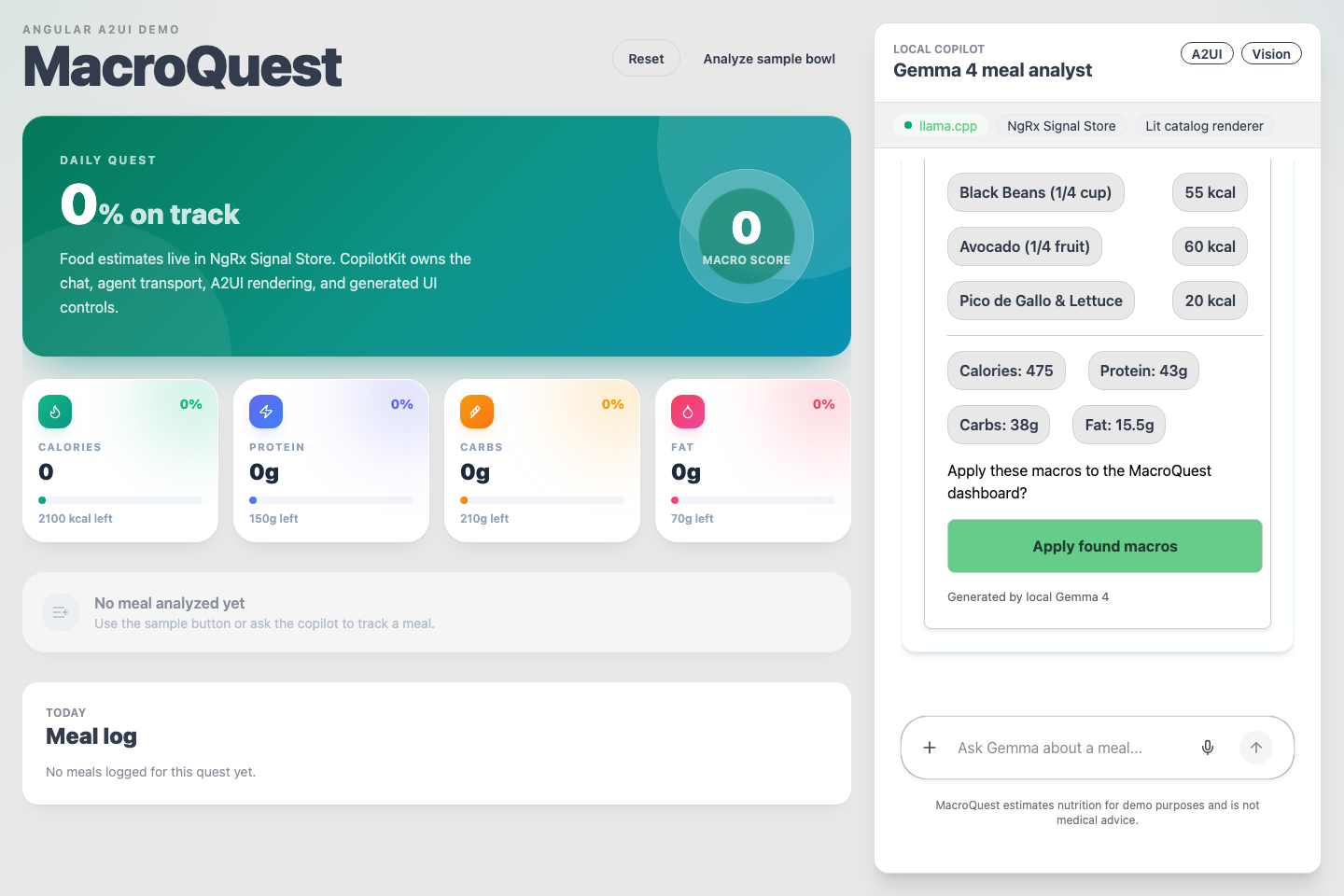
This is the result with all four in place. The user attached a photo of a chicken bowl, and Gemma generated this surface, including item rows, totals, and the Apply button:
Few-shot prompting with a typed example
The meal-analysis prompt contains one complete example response. We keep it as a real TypeScript object, not a string, so it stays readable in code review and is guaranteed to serialize into valid JSON:
const mealUIExample = { mealDraft: { title: 'Grilled chicken bowl', items: [{ name: 'grilled chicken', servingLabel: '1 breast', servings: 1, calories: 280, protein: 52, carbs: 0, fat: 6, confidence: 0.8 }], }, a2ui: { surfaceId: 'macroquest-meal-grilled-chicken-bowl', components: [ { id: 'root', component: 'Card', child: 'layout' }, { id: 'layout', component: 'Column', children: ['title', 'item_row_1', 'divider', /* ... */ 'apply_button'] }, { id: 'title', component: 'Text', text: 'Grilled chicken bowl', variant: 'h2' }, // ... item rows, totals rows, and the applyMealDraft button ], },};In our tests, one complete example was worth more than any amount of schema description. Gemma imitates structure much better than it follows abstract rules. The Angular team's post recommends few-shot prompting too; with a small model it is not optional.
Structural validation
When a response comes back, validateModelGeneratedA2UI walks the tree before anything is streamed to the client. It checks that the surface is renderable and that the required pieces exist. Because the error strings are later fed back to the model as retry feedback, each one is written as an instruction the model can follow:
const allowedModelA2UIComponents = new Set([ 'Button', 'Card', 'Column', 'Divider', 'Row', 'Text',]);// A sample of the checks; see server/index.ts for the full set:errors.push(`component "${id}" uses unsupported component "${name}".`);errors.push(`component "${id}" children[${i}] is not a string id; never inline component objects.`);errors.push(`component "${component.id}" references missing child "${childRef}".`);errors.push(`Row component "${id}" has ${count} children; rows render on a ~380px panel and must have at most 4.`);errors.push('a2ui.components must include one Button whose action is {"event":{"name":"applyMealDraft","context":{...}}}.');Two of these need explanation. The Row rule exists because the model cannot see the viewport; it will happily generate six-column rows for a 380px chat panel, so the constraint has to live in the validator. The Button rule enforces the trust boundary: the model has to include an Apply button, but that button can only fire the applyMealDraft event that we handle ourselves. The model decides where the button goes, not what it does.
Cross-checking the surface against the meal draft
Structural validity is not enough. The response contains the same meal twice: as structured mealDraft data and as the visible A2UI surface. A small model will happily write "520 kcal" on a card whose items sum to 640. So we sum the draft's macros and require each total to appear verbatim in the surface's visible text:
function verifyA2UIMatchesDraft(a2ui: A2UIToolArgs, draft: MealDraft): string[] { const totals = totalsForDraft(draft); const visibleText = a2ui.components .filter((c) => c.component === 'Text' && typeof c.text === 'string') .map((c) => c.text) .join(' '); const errors: string[] = []; for (const [label, value] of [ ['calories', totals.calories], ['protein', totals.protein], ['carbs', totals.carbs], ['fat', totals.fat], ] as const) { if (!new RegExp(`(?<!\\d)${value}(?!\\d)`).test(visibleText)) { errors.push(`the surface must visibly show the total ${label} value ${value}.`); } } return errors;}This guarantees that what the user sees and what the Apply button will log agree. This is crucial, because the whole point of the surface is that the user approves those numbers before they enter the store.
Retry with validation feedback
The loop below ties it together. Our main finding: a 12B model corrects a rejected tree far more reliably than it produces a perfect one on the first try. So instead of tweaking the prompt further, we pass the validator's error messages back and let it try once more:
let validationFeedback: string | undefined;for (let attempt = 0; attempt < 2; attempt += 1) { const generated = await completeJson<ModelGeneratedMealUI>({ prompt: buildMealUIPrompt(prompt, history, context, validationFeedback), responseFormat: modelGeneratedMealUIResponseFormat, temperature: 0.15, abortSignal, }); const draft = draftFromModelResponse(generated); try { const a2ui = a2uiToolArgsFromModelResponse(generated); // throws on structural errors const totalsErrors = verifyA2UIMatchesDraft(a2ui, draft); if (totalsErrors.length > 0 && attempt === 0 && !imageUrl) { throw new Error(totalsErrors.join(' ')); } return { draft, a2ui }; } catch (error) { validationFeedback = error instanceof Error ? error.message : String(error); }}throw new Error(`Model A2UI failed validation twice: ${validationFeedback}`);The if in the middle treats the two error classes differently. Structural errors always trigger the retry, because an unrenderable tree is useless. Mismatched totals only trigger a retry on text turns. On a vision turn, re-encoding the image doubles an already slow call, the nutrition estimates are fuzzy anyway, and a retry regenerates both the draft and the surface, so the numbers would change again. A structurally valid surface is accepted in that case, because surface and draft come from the same response and stay consistent with each other. Budgeting retries per error class made a noticeable difference in perceived speed on local hardware.
If both attempts fail, the user gets a plain status message and no surface. We prefer a missing card over a wrong one.
The applyMealDraft round trip
Now the interactive part. The user clicks the model-authored Apply button. The Angular A2UI surface forwards the applyMealDraft event to the runtime, and the agent checks for it at the start of every run:
const applyAction = getApplyMealDraftAction(input);if (applyAction) { if (appliedMealDraftActionKeys.has(applyAction.actionKey)) { return; // duplicate click or re-delivery; already applied } const draft = pendingMealDraftsBySurface.get(applyAction.surfaceId); if (!draft) { yield textChunk(messageId, assistantCopy.missingPendingDraft); return; } yield textChunk(messageId, assistantCopy.applyingMacros); yield* toolCallEvents(messageId, 'logMealDraft', draft); pendingMealDraftsBySurface.delete(applyAction.surfaceId); appliedMealDraftActionKeys.add(applyAction.actionKey); return;}Notice that there is no model call in this path. The button carries no data we would trust; it is only a trigger. The draft that gets applied is the one the server validated and stored when the surface was generated. The logMealDraft tool call is then executed by the Angular frontend tool, through its Zod schema, into store.applyMealDraft(). The action key (surface + component + timestamp) makes a double click idempotent.
The full loop, end to end:
The model proposes, the server validates, the user approves, a typed tool updates the store, and the dashboard recomputes from signals. The model is only trusted at the first step, and there it is allowed to be wrong, because every later step checks its output.
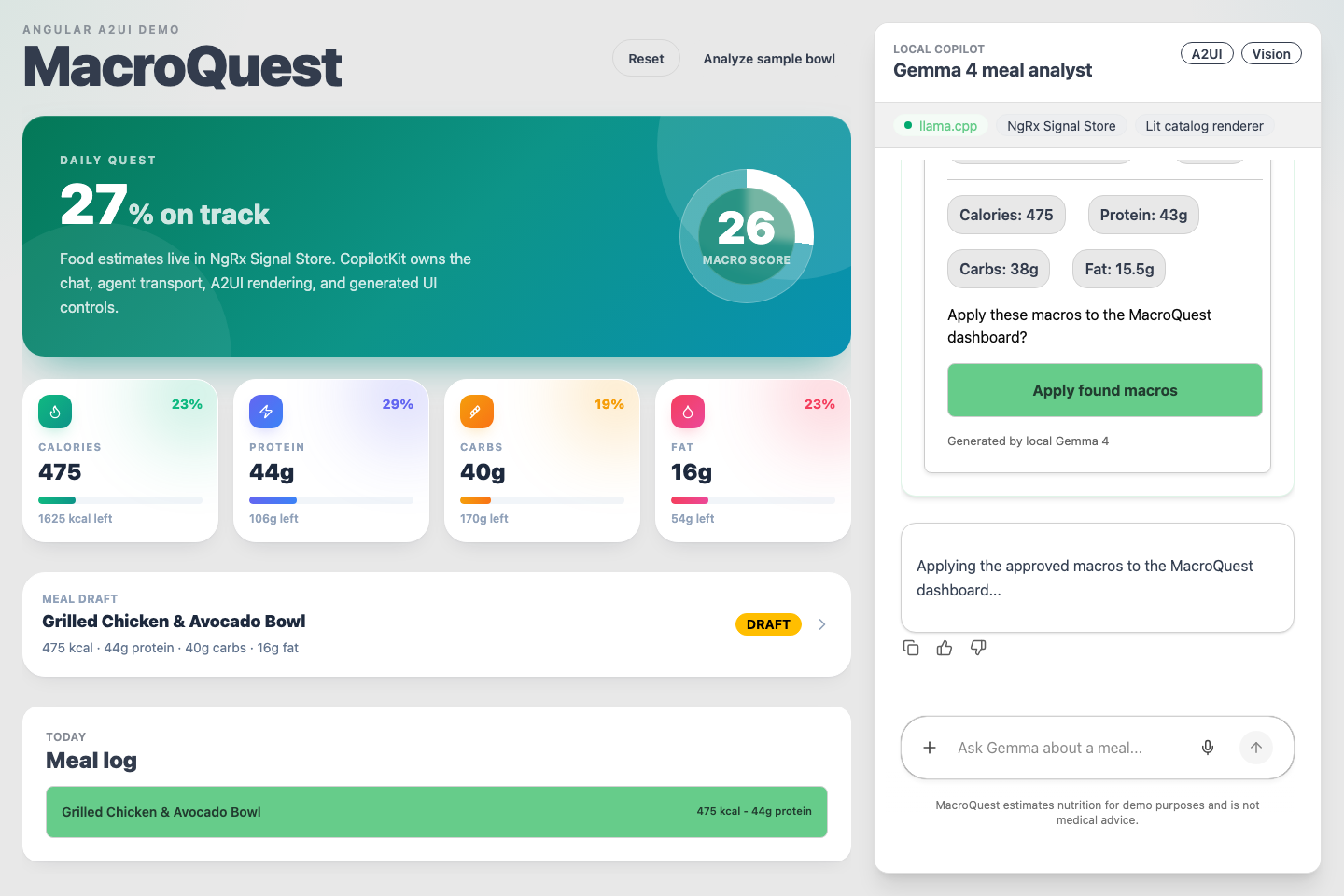
After the click, the numbers from the card are in the store and the dashboard has recomputed:
Open Generative UI: the sandboxed second lane
A2UI surfaces are declarative and catalog-bound: the model can only compose widgets we ship. MacroQuest's second prompt ("suggest a lighter version of my current meal") uses the opposite mechanism. The model generates a free-form interactive widget, and CopilotKit renders it inside a sandboxed iframe.
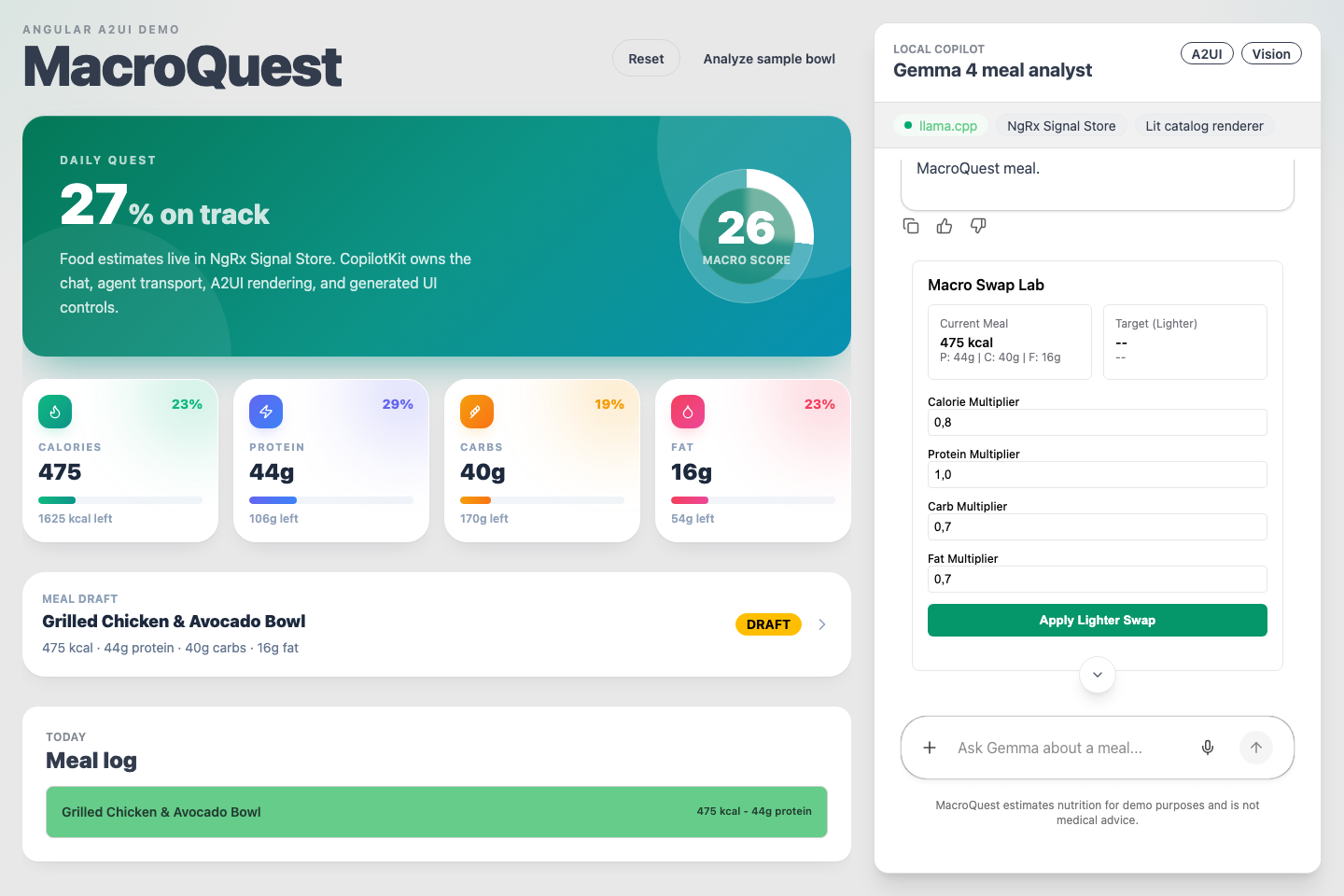
This is the widget Gemma generated for that prompt: a "Macro Swap Lab" with per-macro multiplier inputs and an apply button, running inside the sandbox with the current meal read from trusted state:
Free-form generation needs a stricter boundary than the catalog. The sandbox can only call the functions registered in provideCopilotKit; in our case that is exactly one. Its handler re-checks preconditions on every call instead of trusting the widget's state:
export async function applyMacroSwapFromSandbox(input: MacroSwapSandboxArgs) { if (!sandboxStore) { return { ok: false, message: 'MacroQuest is not ready yet.' }; } const meal = sandboxStore.applyMacroSwap(input); if (!meal) { return { ok: false, message: 'Analyze or select a meal before applying a sandbox swap.' }; } return { ok: true, mealId: meal.id, title: meal.title, totals: getMealTotals(meal) };}The two mechanisms complement each other. A2UI gives the model freedom over layout but no behavior of its own; the sandbox gives it behavior, but only inside an iframe with a one-function API. In both cases the store can only be reached through code we wrote.
Operational notes
A few things we ran into that don't fit anywhere else:
A single-slot llama server changes your frontend config. We initially enabled CopilotKit's dynamic suggestions (available: 'after-first-message'). Each turn then fired a second generation request. On a llama.cpp server with --parallel 1, that request queued against the main chat response and starved it; the run started and finished with no content. Static, client-side-only starter prompts fixed it. If your model server has one slot, make sure your UI only ever requests one completion at a time.
Route intent before you generate. One small classification call up front is more reliable than a large prompt that has to decide and produce at the same time. On a large model this is a nice-to-have; on a 12B it was the difference between working and not working.
Style the surface from outside. The premade renderer paints into a Lit cpk-a2ui-surface element, and since it doesn't use shadow DOM you can theme it with plain global CSS (.copilot-panel cpk-a2ui-surface h2 { ... }). The validator's "max 4 children per Row" rule and a couple of flex overrides handle the rest of the layout on a narrow panel.
Vision turns need their own budget. Image analysis on local hardware is slow enough that every retry policy, token cap, and timeout deserves an if (imageUrl) branch. We also cap the image token budget in the llama.cpp launch script for the same reason.
Conclusion
For us the main takeaway is that A2UI turns "can I trust the model?" into an engineering question. Agent output is a JSON tree you can validate, cross-check, and gate before it renders, and Angular's signals and DI make the trusted side of that boundary straightforward to build. A model that is sometimes wrong is acceptable when its mistakes are caught before they render and cannot change state afterwards.
There is plenty we haven't done yet: a typed custom catalog (MealScanCard, MacroRing) instead of the basic one, deeper streaming, and the Angular 22 + signals-first ergonomics on the roadmap. The whole demo is in the repo: app, runtime, prompts, validators, and Playwright tests. Run the two prompts from the README and read along in server/index.ts. If you build a surface, a catalog, or a harness of your own, we'd like to see it. File an Angular-tagged issue or PR on CopilotKit.
Stay Updated
Get new essays and workshop announcements in your inbox.